> ## Documentation Index
> Fetch the complete documentation index at: https://docs.release0.com/llms.txt
> Use this file to discover all available pages before exploring further.
# What is an Agent in Release0?
> Learn what Agents are in Release0 and how they work as customizable chatbots and interactive forms.
In **Release0**, an **Agent** represents a fully customizable, automated chatbot or interactive form. They serve as the main tool to engage users through conversational workflows and automation.
## How to Create an Agent
1. **Navigate to the Agents section** in your Release0 workspace.
2. **Click on the "Create Agent" button** to start a new agent.
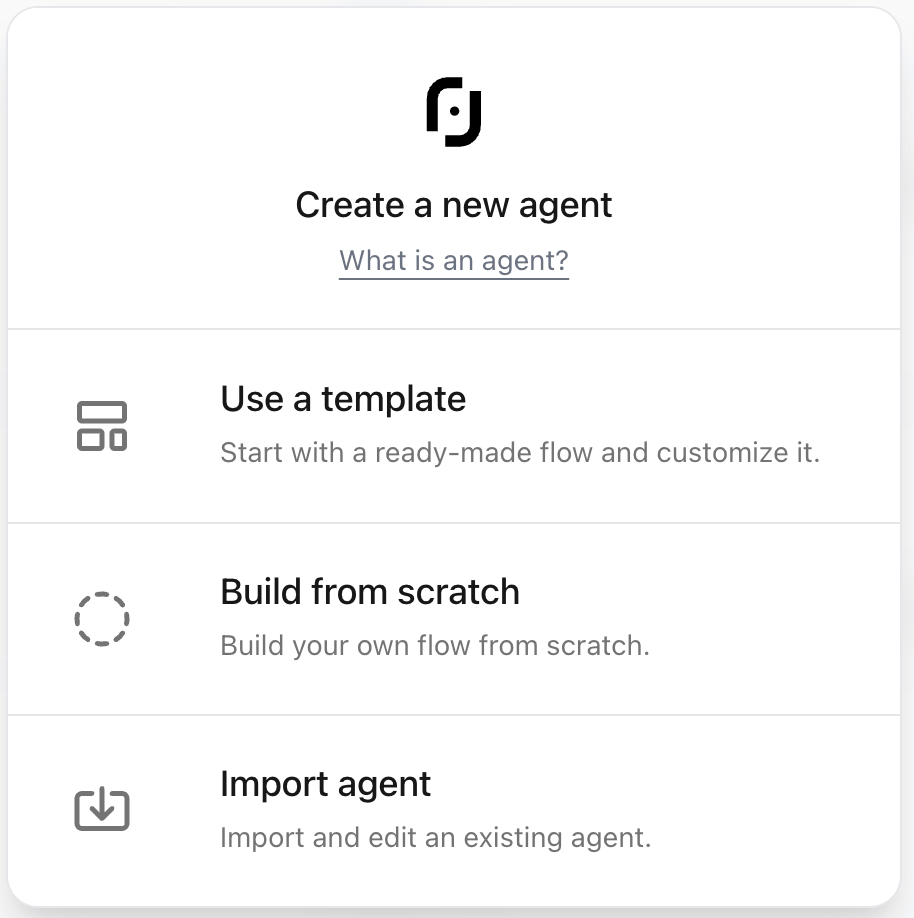
There are 3 ways to create an agent:
* **Use a template**: Choose from a variety of pre-built templates to kickstart your agent.
* **Build from scratch**: Start with a blank canvas and build your agent from the ground up.
* **Import an agent**: Bring in an existing agent from another workspace or account.
### Creating an Agent from Template
When you select the **Use a template** option, you'll be presented with a list of available templates organized in categories. You can browse the categorized templates, preview their name, description, and thumbnail image, and select the one that best fits your needs. You can also see the template agent preview in the right panel to get a better idea of how it will look and function.
### Building an Agent from Scratch
When you select the **Build from scratch** option, you'll be taken to the [flow editor](/editor/graph) where you can start building your agent from a blank canvas. You can add [elements](/editor/elements/overview), customize the flow, and configure settings as needed.
### Importing an Agent
Choosing the **Import an agent** option lets you select a file containing an existing agent from another workspace or account. Once you select the agent file, click on the **Open** button to start the process. Then you'll be taken to the flow editor where you can review and edit the imported agent.
## Core Capabilities
Agents allow you to:
* Guide users through [multi-step](/guides/create-first-agent) conversational flows
* Collect input via [text](/editor/elements/user-inputs/text), [numbers](/editor/elements/user-inputs/number), [emails](/editor/elements/user-inputs/email), [dates](/editor/elements/user-inputs/date), [files](/editor/elements/user-inputs/fileUpload), and more
* Execute logic with conditions and [A/B tests](/editor/elements/logic/ab-test)
* Trigger external tools and APIs ([Google Sheets](/editor/elements/integrations/google-sheets), [Zapier](/editor/elements/integrations/zapier), [Stripe](/editor/elements/user-inputs/collect-payment))
* Display media: **[images](/editor/elements/agent-dialog/image)**, **[videos](/editor/elements/agent-dialog/video)**, **[audio](/editor/elements/agent-dialog/audio)**, **[embeds](/editor/elements/agent-dialog/embed)**
* Integrate advanced AI: **[OpenAI](/editor/elements/ai-agents/openAi)**, **[Dify.AI](/editor/elements/ai-agents/dify)**, **[Mistral](/editor/elements/ai-agents/mistralAI)**, **[Groq](/editor/elements/ai-agents/groq)**, etc.
## Configuration Options
| Setting | Description |
| ---------------------- | --------------------------------------------- |
| **Name & URL** | Define display name and public URL |
| **Icon & Preview** | Choose emoji, image, or URL for agent preview |
| **Public Domain** | Assign under a default or custom domain |
| **Tags & Description** | Categorize for easy filtering |
| **Access Control** | Set expiration, password, or allowed origins |
| **QR Code** | Auto-generated QR code for sharing |
***
## Theming & Customization
* Customize fonts, colors, icons, shadows
* Enable custom branding ([available on Pro+ plans](https://release0.com/pricing))
* Assign [avatars](/theme/overview#agent-bubble) and dynamic themes
* Use reusable [templates](/theme/overview#template) for faster deployment
## Deployment Options
Agents can be deployed via:
* **[Standard embed](/integrations/web/overview#1-standard-embed)** (iframe or component)
* **[Popup](/integrations/web/overview#2-popup-embed)** or **[chat bubble](/integrations/web/overview#3-chat-bubble-embed)**
* **[Direct link](/editor/agent-settings/agent-settings#agent-url) or [QR code](/editor/agent-settings/agent-qr-code-generator)**
* **[Third-party platforms](/integrations/overview)** like Webflow, WordPress, WhatsApp
## Integrations & Automation
Agents seamlessly connect with:
* **[Google Sheets](/editor/elements/integrations/google-sheets)**, **[Zapier](/editor/elements/integrations/zapier)**, **[Make.com](/editor/elements/integrations/make-com)**
* **[Stripe](/editor/elements/user-inputs/collect-payment)** (for payments)
* **[Chatwoot](/editor/elements/integrations/chatwoot)**, **[Cal.com](/editor/elements/integrations/cal)**, **[Resend](/editor/elements/integrations/send-email#configuration-steps-using-resend-as-smtp-providers)**, and more
* Custom **[webhooks](/editor/elements/integrations/http-request#5-optional%3A-call-a-webhook)** and **[HTTP requests](/editor/elements/integrations/http-request)**
## Flow Building elements
Release0 includes [40+ elements](/editor/elements/overview):
* `Text`, `Image`, `Video`, `Audio`
* `User Input`: email, phone, number, date, etc.
* `Logic`: Condition, AB Test, Set Variable
* `AI`: OpenAI, Claude, Mistral, Groq
* `Integrations`: Stripe, Zapier, HTTP, Webhook
## Analytics & Insights
* [Real-time](/submission/realtime) and historical [analytics](/submission/analytics)
* Track completion/drop-off rates
* UTM capture for campaigns
* Integration with [Google Analytics](/editor/agent-settings/advanced-settings#google-tag-manager) & [Meta Pixel](/editor/elements/integrations/meta-pixel)
## Curious why conversational agents often outperform traditional forms?
Explore our [Chatbots vs Forms: Which Converts Better?](https://release0.com/blog/chatbots-vs-forms-which-converts-better) blog post for data and insights.
> Agents are at the heart of Release0's platform—designed for scalability, automation, and seamless user interaction.
 ### Creating an Agent from Template
When you select the **Use a template** option, you'll be presented with a list of available templates organized in categories. You can browse the categorized templates, preview their name, description, and thumbnail image, and select the one that best fits your needs. You can also see the template agent preview in the right panel to get a better idea of how it will look and function.
### Building an Agent from Scratch
When you select the **Build from scratch** option, you'll be taken to the [flow editor](/editor/graph) where you can start building your agent from a blank canvas. You can add [elements](/editor/elements/overview), customize the flow, and configure settings as needed.
### Importing an Agent
Choosing the **Import an agent** option lets you select a file containing an existing agent from another workspace or account. Once you select the agent file, click on the **Open** button to start the process. Then you'll be taken to the flow editor where you can review and edit the imported agent.
## Core Capabilities
Agents allow you to:
* Guide users through [multi-step](/guides/create-first-agent) conversational flows
* Collect input via [text](/editor/elements/user-inputs/text), [numbers](/editor/elements/user-inputs/number), [emails](/editor/elements/user-inputs/email), [dates](/editor/elements/user-inputs/date), [files](/editor/elements/user-inputs/fileUpload), and more
* Execute logic with conditions and [A/B tests](/editor/elements/logic/ab-test)
* Trigger external tools and APIs ([Google Sheets](/editor/elements/integrations/google-sheets), [Zapier](/editor/elements/integrations/zapier), [Stripe](/editor/elements/user-inputs/collect-payment))
* Display media: **[images](/editor/elements/agent-dialog/image)**, **[videos](/editor/elements/agent-dialog/video)**, **[audio](/editor/elements/agent-dialog/audio)**, **[embeds](/editor/elements/agent-dialog/embed)**
* Integrate advanced AI: **[OpenAI](/editor/elements/ai-agents/openAi)**, **[Dify.AI](/editor/elements/ai-agents/dify)**, **[Mistral](/editor/elements/ai-agents/mistralAI)**, **[Groq](/editor/elements/ai-agents/groq)**, etc.
## Configuration Options
| Setting | Description |
| ---------------------- | --------------------------------------------- |
| **Name & URL** | Define display name and public URL |
| **Icon & Preview** | Choose emoji, image, or URL for agent preview |
| **Public Domain** | Assign under a default or custom domain |
| **Tags & Description** | Categorize for easy filtering |
| **Access Control** | Set expiration, password, or allowed origins |
| **QR Code** | Auto-generated QR code for sharing |
***
## Theming & Customization
* Customize fonts, colors, icons, shadows
* Enable custom branding ([available on Pro+ plans](https://release0.com/pricing))
* Assign [avatars](/theme/overview#agent-bubble) and dynamic themes
* Use reusable [templates](/theme/overview#template) for faster deployment
## Deployment Options
Agents can be deployed via:
* **[Standard embed](/integrations/web/overview#1-standard-embed)** (iframe or component)
* **[Popup](/integrations/web/overview#2-popup-embed)** or **[chat bubble](/integrations/web/overview#3-chat-bubble-embed)**
* **[Direct link](/editor/agent-settings/agent-settings#agent-url) or [QR code](/editor/agent-settings/agent-qr-code-generator)**
* **[Third-party platforms](/integrations/overview)** like Webflow, WordPress, WhatsApp
## Integrations & Automation
Agents seamlessly connect with:
* **[Google Sheets](/editor/elements/integrations/google-sheets)**, **[Zapier](/editor/elements/integrations/zapier)**, **[Make.com](/editor/elements/integrations/make-com)**
* **[Stripe](/editor/elements/user-inputs/collect-payment)** (for payments)
* **[Chatwoot](/editor/elements/integrations/chatwoot)**, **[Cal.com](/editor/elements/integrations/cal)**, **[Resend](/editor/elements/integrations/send-email#configuration-steps-using-resend-as-smtp-providers)**, and more
* Custom **[webhooks](/editor/elements/integrations/http-request#5-optional%3A-call-a-webhook)** and **[HTTP requests](/editor/elements/integrations/http-request)**
## Flow Building elements
Release0 includes [40+ elements](/editor/elements/overview):
* `Text`, `Image`, `Video`, `Audio`
* `User Input`: email, phone, number, date, etc.
* `Logic`: Condition, AB Test, Set Variable
* `AI`: OpenAI, Claude, Mistral, Groq
* `Integrations`: Stripe, Zapier, HTTP, Webhook
## Analytics & Insights
* [Real-time](/submission/realtime) and historical [analytics](/submission/analytics)
* Track completion/drop-off rates
* UTM capture for campaigns
* Integration with [Google Analytics](/editor/agent-settings/advanced-settings#google-tag-manager) & [Meta Pixel](/editor/elements/integrations/meta-pixel)
## Curious why conversational agents often outperform traditional forms?
Explore our [Chatbots vs Forms: Which Converts Better?](https://release0.com/blog/chatbots-vs-forms-which-converts-better) blog post for data and insights.
> Agents are at the heart of Release0's platform—designed for scalability, automation, and seamless user interaction.
### Creating an Agent from Template
When you select the **Use a template** option, you'll be presented with a list of available templates organized in categories. You can browse the categorized templates, preview their name, description, and thumbnail image, and select the one that best fits your needs. You can also see the template agent preview in the right panel to get a better idea of how it will look and function.
### Building an Agent from Scratch
When you select the **Build from scratch** option, you'll be taken to the [flow editor](/editor/graph) where you can start building your agent from a blank canvas. You can add [elements](/editor/elements/overview), customize the flow, and configure settings as needed.
### Importing an Agent
Choosing the **Import an agent** option lets you select a file containing an existing agent from another workspace or account. Once you select the agent file, click on the **Open** button to start the process. Then you'll be taken to the flow editor where you can review and edit the imported agent.
## Core Capabilities
Agents allow you to:
* Guide users through [multi-step](/guides/create-first-agent) conversational flows
* Collect input via [text](/editor/elements/user-inputs/text), [numbers](/editor/elements/user-inputs/number), [emails](/editor/elements/user-inputs/email), [dates](/editor/elements/user-inputs/date), [files](/editor/elements/user-inputs/fileUpload), and more
* Execute logic with conditions and [A/B tests](/editor/elements/logic/ab-test)
* Trigger external tools and APIs ([Google Sheets](/editor/elements/integrations/google-sheets), [Zapier](/editor/elements/integrations/zapier), [Stripe](/editor/elements/user-inputs/collect-payment))
* Display media: **[images](/editor/elements/agent-dialog/image)**, **[videos](/editor/elements/agent-dialog/video)**, **[audio](/editor/elements/agent-dialog/audio)**, **[embeds](/editor/elements/agent-dialog/embed)**
* Integrate advanced AI: **[OpenAI](/editor/elements/ai-agents/openAi)**, **[Dify.AI](/editor/elements/ai-agents/dify)**, **[Mistral](/editor/elements/ai-agents/mistralAI)**, **[Groq](/editor/elements/ai-agents/groq)**, etc.
## Configuration Options
| Setting | Description |
| ---------------------- | --------------------------------------------- |
| **Name & URL** | Define display name and public URL |
| **Icon & Preview** | Choose emoji, image, or URL for agent preview |
| **Public Domain** | Assign under a default or custom domain |
| **Tags & Description** | Categorize for easy filtering |
| **Access Control** | Set expiration, password, or allowed origins |
| **QR Code** | Auto-generated QR code for sharing |
***
## Theming & Customization
* Customize fonts, colors, icons, shadows
* Enable custom branding ([available on Pro+ plans](https://release0.com/pricing))
* Assign [avatars](/theme/overview#agent-bubble) and dynamic themes
* Use reusable [templates](/theme/overview#template) for faster deployment
## Deployment Options
Agents can be deployed via:
* **[Standard embed](/integrations/web/overview#1-standard-embed)** (iframe or component)
* **[Popup](/integrations/web/overview#2-popup-embed)** or **[chat bubble](/integrations/web/overview#3-chat-bubble-embed)**
* **[Direct link](/editor/agent-settings/agent-settings#agent-url) or [QR code](/editor/agent-settings/agent-qr-code-generator)**
* **[Third-party platforms](/integrations/overview)** like Webflow, WordPress, WhatsApp
## Integrations & Automation
Agents seamlessly connect with:
* **[Google Sheets](/editor/elements/integrations/google-sheets)**, **[Zapier](/editor/elements/integrations/zapier)**, **[Make.com](/editor/elements/integrations/make-com)**
* **[Stripe](/editor/elements/user-inputs/collect-payment)** (for payments)
* **[Chatwoot](/editor/elements/integrations/chatwoot)**, **[Cal.com](/editor/elements/integrations/cal)**, **[Resend](/editor/elements/integrations/send-email#configuration-steps-using-resend-as-smtp-providers)**, and more
* Custom **[webhooks](/editor/elements/integrations/http-request#5-optional%3A-call-a-webhook)** and **[HTTP requests](/editor/elements/integrations/http-request)**
## Flow Building elements
Release0 includes [40+ elements](/editor/elements/overview):
* `Text`, `Image`, `Video`, `Audio`
* `User Input`: email, phone, number, date, etc.
* `Logic`: Condition, AB Test, Set Variable
* `AI`: OpenAI, Claude, Mistral, Groq
* `Integrations`: Stripe, Zapier, HTTP, Webhook
## Analytics & Insights
* [Real-time](/submission/realtime) and historical [analytics](/submission/analytics)
* Track completion/drop-off rates
* UTM capture for campaigns
* Integration with [Google Analytics](/editor/agent-settings/advanced-settings#google-tag-manager) & [Meta Pixel](/editor/elements/integrations/meta-pixel)
## Curious why conversational agents often outperform traditional forms?
Explore our [Chatbots vs Forms: Which Converts Better?](https://release0.com/blog/chatbots-vs-forms-which-converts-better) blog post for data and insights.
> Agents are at the heart of Release0's platform—designed for scalability, automation, and seamless user interaction.