> ## Documentation Index
> Fetch the complete documentation index at: https://docs.release0.com/llms.txt
> Use this file to discover all available pages before exploring further.
# How to integrate your Agent with Perplexity
> Learn how to configure Perplexity’s AI model for chat completions.
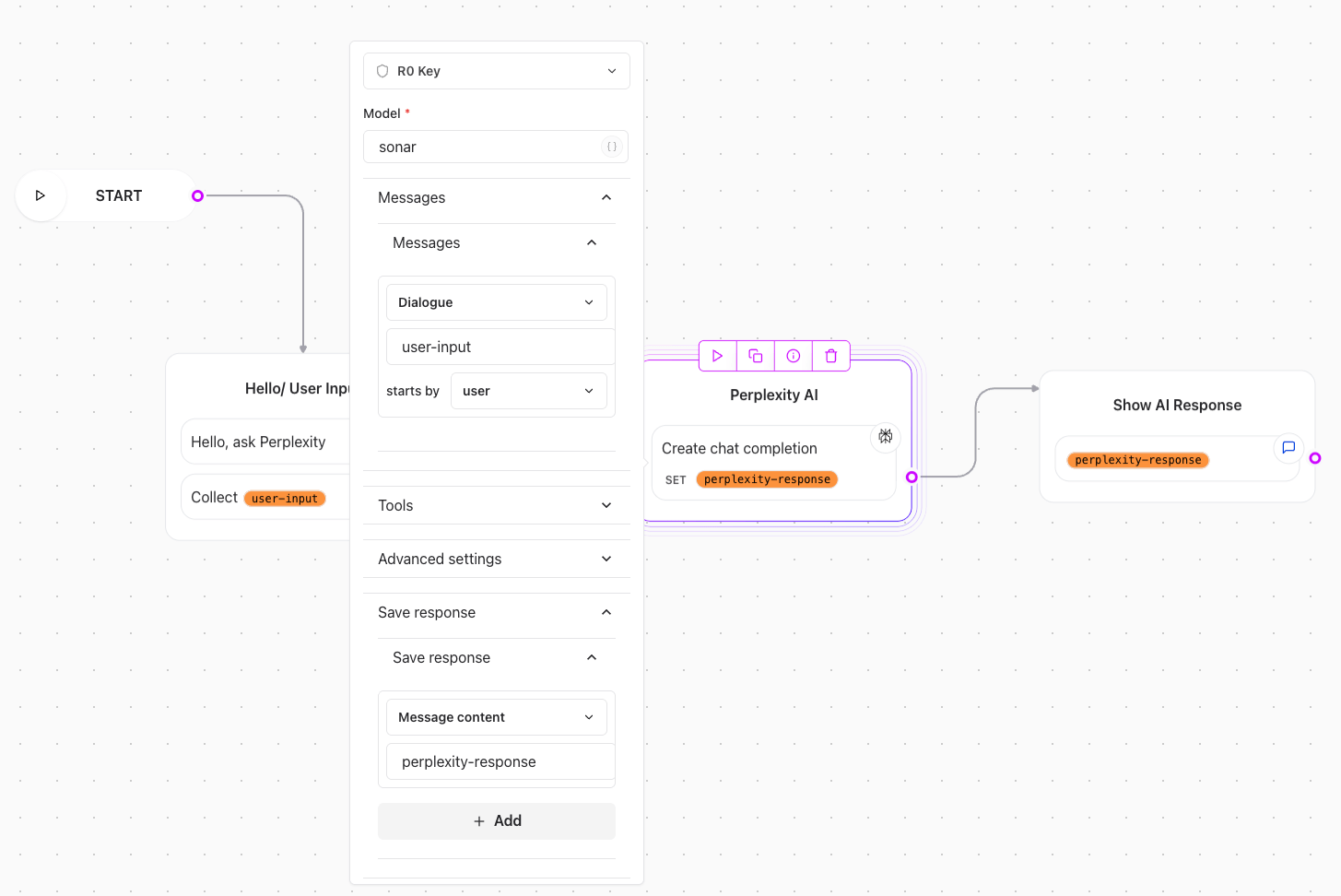
This guide explains how to configure a chat completion flow with Perplexity’s AI model.
### **Prerequisites**:
To integrate Perplexity with your agent, you’ll need a Perplexity account with API access. You can create an account at [Perplexity](https://www.perplexity.ai/).
Once you have an account, you need to create an API key. You can do this by going to the [API keys](https://www.perplexity.ai/account/api/keys) section of your Perplexity account and clicking on the **Create API Key** button. This will generate a new API key that you can use to authenticate your requests to the Perplexity API.
Once you have your API key, you can add it to your agent by configuring the **Perplexity** element. Here you can enter your API key and select the Perplexity model you want to use.
## 1. Configuring Perplexity element
1. Copy the API key and paste it in the Perplexity element.
2. Select a model from the available list. For example `sonar`.
3. Provide Messages:
* Create a variable for storing user input messages (e.g., `{{user-input}}`).
* Select the Message Type for example 'Dialogue'.
* Add the variable where the user input was captured (e.g., `{{user-input}}`).
* Set the 'starts by' to 'user'.
* In the 'Save response' section, create a variable for storing the assistant response (e.g., `{{perplexity-response}}`).
* Add a text element to append the show response chat (e.g., `{{perplexity-response}}`).
> **Note**: You need a valid payment method to generate the API key. You can start with as low as a \$3 dollar credit.
### Use case video example
 > **Note**: You need a valid payment method to generate the API key. You can start with as low as a \$3 dollar credit.
### Use case video example
> **Note**: You need a valid payment method to generate the API key. You can start with as low as a \$3 dollar credit.
### Use case video example