> ## Documentation Index
> Fetch the complete documentation index at: https://docs.release0.com/llms.txt
> Use this file to discover all available pages before exploring further.
# How to integrate your Agent with Cal.com
> Integrate Cal.com with Release0 to enable seamless scheduling within your chatbot experience.
Integrating Release0 with **Cal.com** allows seamless scheduling within your chatbot experience. This integration enables users to book meetings directly through the conversation flow.
## Prerequisites
Before integrating Cal.com with Release0, ensure you have:
* A **Cal.com** account with an active scheduling link.
## Steps to Integrate
### 1. Get Your Cal.com Scheduling Link
1. Log in to **Cal.com**.
2. Navigate to the event type you want to share.
3. Copy the **public scheduling link** (e.g., `https://cal.com/yourname/meeting`).
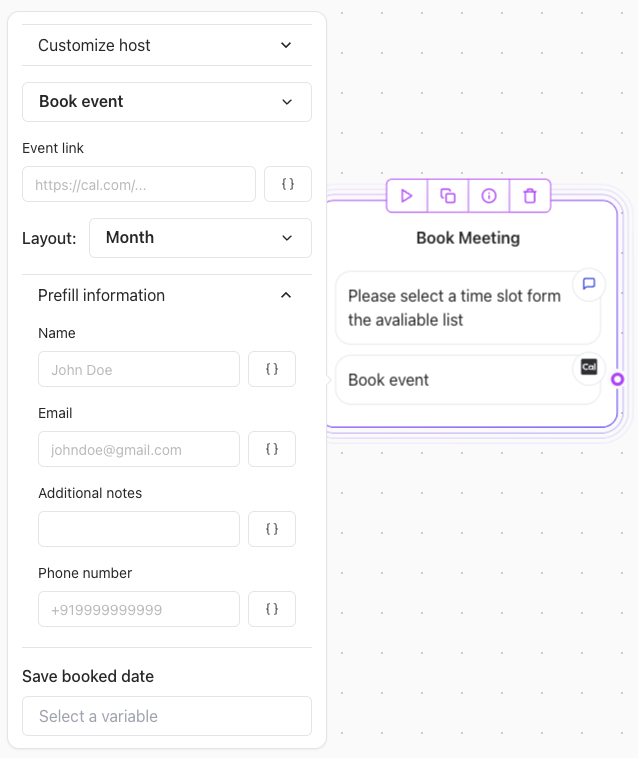
### 2. Add a Cal.com integration element in Release0
To allow users to book a meeting, use a **Button Component**:
 ### Conditional Display
You can conditionally show the booking button based on user actions using **[Logic elements](../logic/condition)** in Release0.
### Conditional Display
You can conditionally show the booking button based on user actions using **[Logic elements](../logic/condition)** in Release0.