> ## Documentation Index
> Fetch the complete documentation index at: https://docs.release0.com/llms.txt
> Use this file to discover all available pages before exploring further.
# How to use the AB Test element
> Optimize user experiences by conducting A/B tests within your chatbot flow using the AB Test element. Learn how to split user traffic, customize path percentages, and analyze performance.
The **AB Test** element is a tool that allows you to randomly split user interactions into two or more paths. This is especially useful for conducting **A/B testing** to compare the performance of different options, such as responses, user experiences, or decision paths.
### **Features of the AB Test element**
1. **Randomized Path Distribution**:
* The element allows you to assign percentages for how users are split between two paths (e.g., 75% for Path A and 25% for Path B).
2. **Customizable Percentages**:
* You can control the percentage of users directed to each path to meet your testing needs.
3. **Expandability**:
* For more than two paths, you can stack multiple AB Test elements to create additional splits.
### **Use Cases**
1. **Response Optimization**:
Test different replies or messages to see which generates the best user engagement.
* Example: Test a formal tone in Path A vs. a casual tone in Path B.
2. **UI or UX Variants**:
Test different layouts, buttons, or features to determine which version users prefer.
3. **Conversion Testing**:
Compare two or more paths to see which leads to better conversions, such as sign-ups or purchases.
### **Example Configuration**
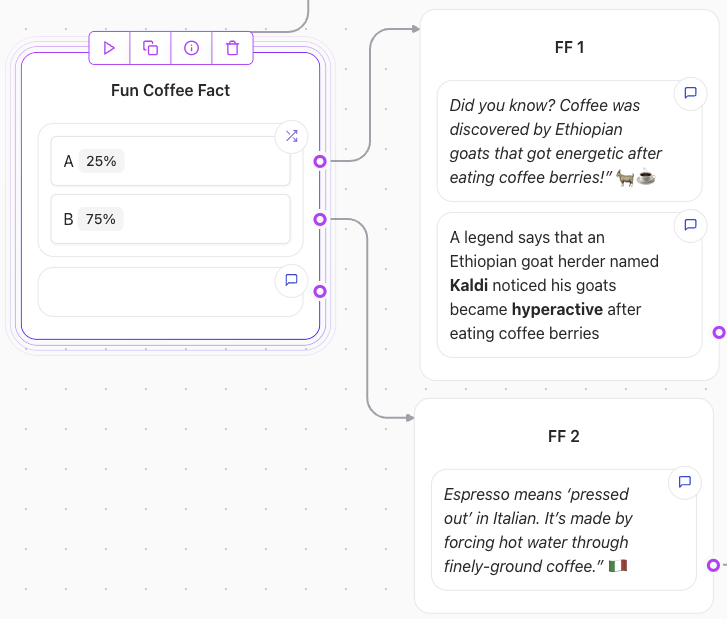
#### **Simple A/B Test**
* **Path A**: 25% of users follow this path.
* **Path B**: 75% of users follow this path.
 #### **Adding Multiple Paths**
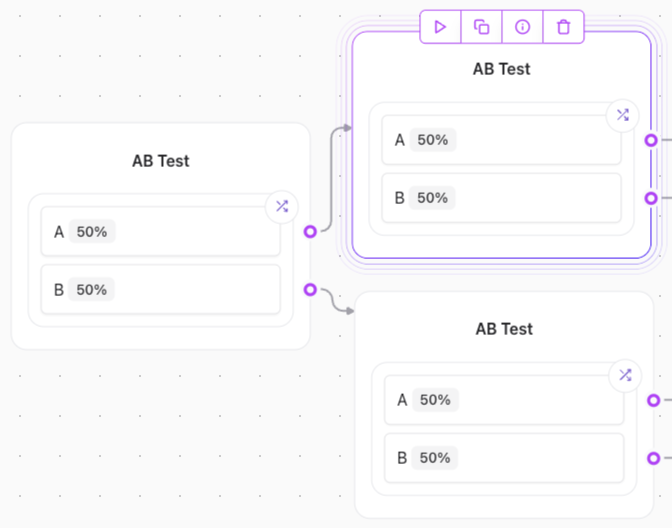
You can chain or stack AB Test elements to create additional splits:
1. First AB Test element splits 50% of users into Path A and 50% into Path B.
2. A second AB Test element further splits Path A into two sub-paths.
#### **Adding Multiple Paths**
You can chain or stack AB Test elements to create additional splits:
1. First AB Test element splits 50% of users into Path A and 50% into Path B.
2. A second AB Test element further splits Path A into two sub-paths.
 ### **Best Practices**
* **Set Clear Goals**: Define the success metrics for your A/B test (e.g., higher click-through rates or conversions).
* **Use Balanced Splits Initially**: Start with a 50/50 split to gather unbiased data.
* **Adjust Percentages Strategically**: Once one path outperforms the other, allocate more users to the better-performing path.
The **AB Test element** is a powerful tool for optimizing user experiences through data-driven experimentation.
### **Best Practices**
* **Set Clear Goals**: Define the success metrics for your A/B test (e.g., higher click-through rates or conversions).
* **Use Balanced Splits Initially**: Start with a 50/50 split to gather unbiased data.
* **Adjust Percentages Strategically**: Once one path outperforms the other, allocate more users to the better-performing path.
The **AB Test element** is a powerful tool for optimizing user experiences through data-driven experimentation.