> ## Documentation Index
> Fetch the complete documentation index at: https://docs.release0.com/llms.txt
> Use this file to discover all available pages before exploring further.
# How to use the Condition element
> Understand how to use the Condition element to create decision points and logical paths in your agent flow.
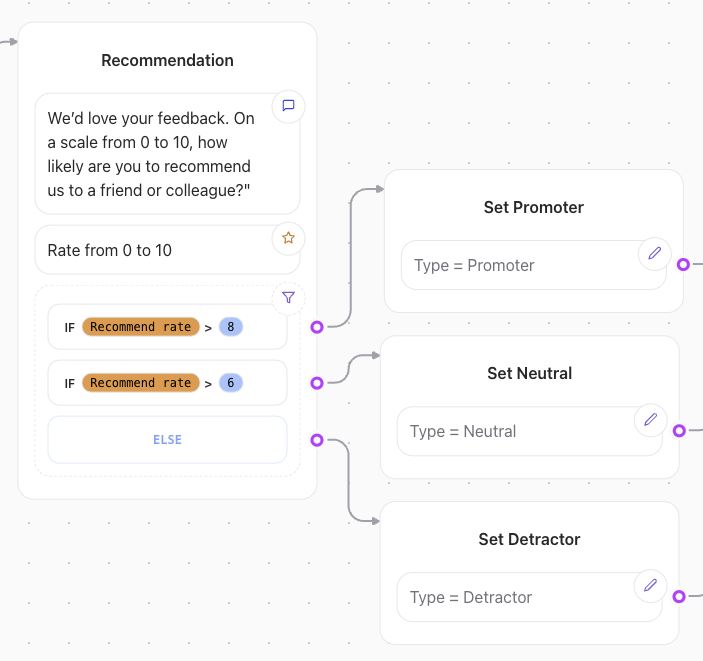
The **Condition** element is used to create decision points in a flow, allowing paths to diverge based on specific conditions. For example, you can implement logic such as:\
*“If Score is greater than 10, follow this path. Otherwise, follow another path.”*
## How Conditions Work
A condition element evaluates one or more comparisons, which can be combined using logical operators **AND** or **OR**:
* **AND**: All comparisons must evaluate to `true` for the condition to pass.
* **OR**: At least one comparison must evaluate to `true` for the condition to pass.
Each comparison checks a **value** against a specific **operator**.
 ## Operators Available and Their Behavior
| **Operator** | **Description** | **Example** |
| ------------------------ | ------------------------------------------------------------------------------------------------------------------------- | ----------------------------------------------------------------------------------------- |
| **Equal to** | Matches if the provided value is *strictly equal* to the target value. | `"age" = 25` will match if `age` is exactly `25`. |
| **Not equal** | Matches if the provided value is *not equal* to the target value. | `"status" Not equal "active"` will match if `status` is not `"active"`. |
| **Contains** | Matches if the provided value *contains* the target value (or shares any elements if a list is provided). | `"tags" contains "important"` will match if `tags` includes `"important"`. |
| **Does not contain** | Matches if the provided value *does not contain* the target value (or does not share any elements if a list is provided). | `"tags" does not contain "important"` will match if `tags` excludes `"important"`. |
| **Greater than** | Matches if the provided value is greater than or equal to the target value. | `"score" Greater than 20` will match if `score` is greater than or equal to `20`. |
| **Less than** | Matches if the provided value is less than or equal to the target value. | `"score" Less than 20` will match if `score` is less than or equal to `20`. |
| **Is set** | Matches if the provided value is neither `null`, `undefined`, nor an empty string. | `"user.name" is set` will match if `user.name` is not empty. |
| **Is empty** | Matches if the provided value is `null`, `undefined`, or an empty string. | `"user.email" is empty` will match if `user.email` is empty. |
| **Starts with** | Matches if the provided value starts with the target value. | `"username" starts with "admin"` will match if `username` begins with `"admin"`. |
| **Ends with** | Matches if the provided value ends with the target value. | `"filename" ends with ".jpg"` will match if `filename` ends with `".jpg"`. |
| **Matches regex** | Matches if the provided value conforms to a valid regex pattern. | `"message" matches /^hello$/` will match if `message` is exactly `"hello"`. |
| **Does not match regex** | Matches if the provided value does not conform to a regex pattern. | `"input" does not match /^[a-z]+$/` will match if `input` contains non-lowercase letters. |
## Regex Examples
Regex patterns can help match complex string conditions:
* **Exact Match**: `/^hello$/` matches the string `"hello"`, but not `"hello world"`.
* **Contains Substring**: `/hello/` matches any string containing `"hello"` (e.g., `"hello world"`).
* **Case-Insensitive Match**: `/hello/i` matches `"Hello"` or `"HELLO"`.
* **Digit Check**: `/[0-9]+/` matches strings with one or more digits, such as `"123"` or `"abc123"`.
**Note**: Regex patterns must start and end with `/` to be valid.
## Example Use Case
If you want to route a flow based on the user’s score, you can define:
1. **Condition**: `Score > 20`\
**Path A**: "High Score Route"\
**Path B**: "Low Score Route"
2. **Condition**: `User Tags contains "premium"`\
**Path A**: "Premium Features Route"\
**Path B**: "Basic Features Route"
This enables dynamic and personalized user interactions based on predefined logic.
## Operators Available and Their Behavior
| **Operator** | **Description** | **Example** |
| ------------------------ | ------------------------------------------------------------------------------------------------------------------------- | ----------------------------------------------------------------------------------------- |
| **Equal to** | Matches if the provided value is *strictly equal* to the target value. | `"age" = 25` will match if `age` is exactly `25`. |
| **Not equal** | Matches if the provided value is *not equal* to the target value. | `"status" Not equal "active"` will match if `status` is not `"active"`. |
| **Contains** | Matches if the provided value *contains* the target value (or shares any elements if a list is provided). | `"tags" contains "important"` will match if `tags` includes `"important"`. |
| **Does not contain** | Matches if the provided value *does not contain* the target value (or does not share any elements if a list is provided). | `"tags" does not contain "important"` will match if `tags` excludes `"important"`. |
| **Greater than** | Matches if the provided value is greater than or equal to the target value. | `"score" Greater than 20` will match if `score` is greater than or equal to `20`. |
| **Less than** | Matches if the provided value is less than or equal to the target value. | `"score" Less than 20` will match if `score` is less than or equal to `20`. |
| **Is set** | Matches if the provided value is neither `null`, `undefined`, nor an empty string. | `"user.name" is set` will match if `user.name` is not empty. |
| **Is empty** | Matches if the provided value is `null`, `undefined`, or an empty string. | `"user.email" is empty` will match if `user.email` is empty. |
| **Starts with** | Matches if the provided value starts with the target value. | `"username" starts with "admin"` will match if `username` begins with `"admin"`. |
| **Ends with** | Matches if the provided value ends with the target value. | `"filename" ends with ".jpg"` will match if `filename` ends with `".jpg"`. |
| **Matches regex** | Matches if the provided value conforms to a valid regex pattern. | `"message" matches /^hello$/` will match if `message` is exactly `"hello"`. |
| **Does not match regex** | Matches if the provided value does not conform to a regex pattern. | `"input" does not match /^[a-z]+$/` will match if `input` contains non-lowercase letters. |
## Regex Examples
Regex patterns can help match complex string conditions:
* **Exact Match**: `/^hello$/` matches the string `"hello"`, but not `"hello world"`.
* **Contains Substring**: `/hello/` matches any string containing `"hello"` (e.g., `"hello world"`).
* **Case-Insensitive Match**: `/hello/i` matches `"Hello"` or `"HELLO"`.
* **Digit Check**: `/[0-9]+/` matches strings with one or more digits, such as `"123"` or `"abc123"`.
**Note**: Regex patterns must start and end with `/` to be valid.
## Example Use Case
If you want to route a flow based on the user’s score, you can define:
1. **Condition**: `Score > 20`\
**Path A**: "High Score Route"\
**Path B**: "Low Score Route"
2. **Condition**: `User Tags contains "premium"`\
**Path A**: "Premium Features Route"\
**Path B**: "Basic Features Route"
This enables dynamic and personalized user interactions based on predefined logic.