> ## Documentation Index
> Fetch the complete documentation index at: https://docs.release0.com/llms.txt
> Use this file to discover all available pages before exploring further.
# How to use the Set Variable element
> The Set Variable element dynamically assigns, manipulates, and manages variables in workflows, enabling advanced operations and data transformations within your chatbot agent.
The **Set Variable** element is a versatile tool that allows you to assign, manipulate, and manage variables dynamically in workflows. Below is a comprehensive guide explaining its functionalities and use cases.
The **Set Variable** element enables you to:
1. Assign predefined values or custom values to variables.
2. Manipulate variables using JavaScript expressions.
3. Transform variables for specific operations (e.g., calculations, string transformations).
4. Fetch specific data from lists using index mapping.
5. Reset or append values to variables dynamically during execution.
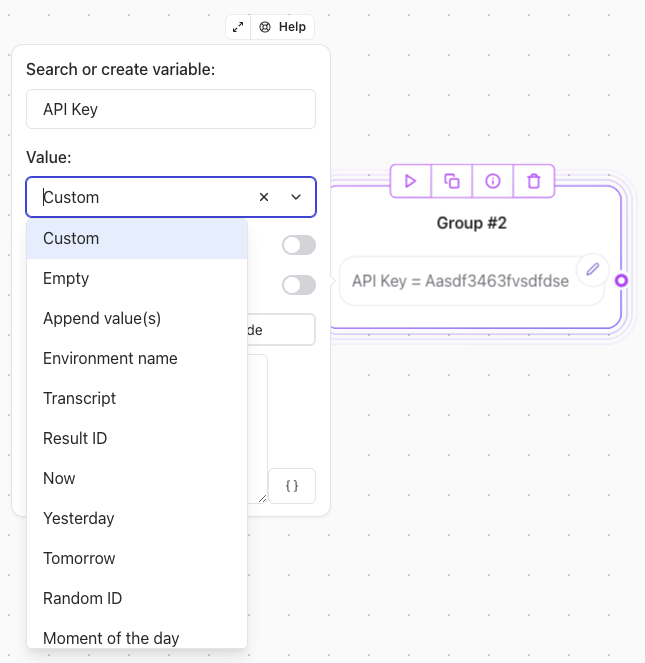 ### **Custom Values**
You can set a variable with:
* Plain text (e.g., `Welcome to our service!`).
* Dynamic JavaScript code for advanced operations.
**Examples**:
```javascript theme={null}
'John' + ' Smith'
// Returns: "John Smith"
```
```javascript theme={null}
const base = 'https://example.com/';
const endpoint = 'api';
return base + endpoint;
// Returns: "https://example.com/api"
```
> **Note**: If the `return` keyword is omitted, it is automatically added.
### **Expressions with Existing Variables**
Apply operations directly on variables to compute new values.
**Examples**:
* **Add a Value to a Variable**:
```javascript theme={null}
{{Score}} + 5
```
* **Compute a Sum of Variables**:
```javascript theme={null}
{{Score}} + {{Answer}}
```
* **Extract First Name from Full Name**:
```javascript theme={null}
{{FullName}}.split(' ')[0]
```
* **Transform to Uppercase**:
```javascript theme={null}
{{Name}}.toUpperCase()
```
### **Predefined Value Options**
#### **Empty**
Resets the variable to its uninitialized state.
#### **Append Values**
Converts the variable into a list and appends new values.
#### **Environment Name**
Sets the variable as `web` or `whatsapp` based on the user's platform.
#### **Transcript**
Saves the conversation transcript into a variable. Useful for sending recaps or providing AI context.
#### **Result ID**
Assigns the unique ID corresponding to the current user interaction.
#### **Random ID**
Generates a unique ID using the **CUID** algorithm.
#### **Pop**
The Pop operation removes the last item from the list variable you provide, and stores that item in the Popped item variable.
It is particularly useful when you want to build a loop that processes list items one by one.
#### **Shift**
The Shift operation removes the first item from the list variable you provide, and stores that item In the Shifted item variable.
It is particularly useful when you want to build a loop that processes list items one by one.
#### **Moment of the Day**
Sets the variable with values like:
* `morning`
* `afternoon`
* `evening`
* `night`
This is determined based on the user's local time.
***
### **Advanced Operations**
#### **Map Item with Same Index**
Fetch data from a corresponding index in two parallel lists.
**Example**:
* **Scenario**: You have two lists:
* `Labels`: `[Action, Drama, Comedy]`
* `IDs`: `[123, 456, 789]`
* When the user selects "Drama," the variable `Selected ID` is set to `456`.
***
### **Date and Time Presets**
Assign date values:
* `Yesterday`, `Now`, or `Tomorrow` in ISO format.
* Optional timezone adjustments.
***
### **Client-Side Execution**
Run custom JavaScript on the user's browser to access client-specific properties.
**Example**: Fetch the user's geolocation:
```javascript theme={null}
function getLocation() {
return new Promise((resolve) => {
navigator.geolocation.getCurrentPosition(
(position) => resolve(`${position.coords.latitude}, ${position.coords.longitude}`),
(error) => resolve('error'),
{ enableHighAccuracy: true, timeout: 5000 }
);
});
}
const coords = await getLocation();
if (coords === 'error') {
return 'Unable to get location';
}
return coords;
```
> **Note**: Enable **"Execute on Client"** to use browser-specific features.
***
### **Save in Results**
By default, variables are session-specific. Enabling this option will save the variable in the **[Submissions table](/submission/overview)** for future reference.
### **Custom Values**
You can set a variable with:
* Plain text (e.g., `Welcome to our service!`).
* Dynamic JavaScript code for advanced operations.
**Examples**:
```javascript theme={null}
'John' + ' Smith'
// Returns: "John Smith"
```
```javascript theme={null}
const base = 'https://example.com/';
const endpoint = 'api';
return base + endpoint;
// Returns: "https://example.com/api"
```
> **Note**: If the `return` keyword is omitted, it is automatically added.
### **Expressions with Existing Variables**
Apply operations directly on variables to compute new values.
**Examples**:
* **Add a Value to a Variable**:
```javascript theme={null}
{{Score}} + 5
```
* **Compute a Sum of Variables**:
```javascript theme={null}
{{Score}} + {{Answer}}
```
* **Extract First Name from Full Name**:
```javascript theme={null}
{{FullName}}.split(' ')[0]
```
* **Transform to Uppercase**:
```javascript theme={null}
{{Name}}.toUpperCase()
```
### **Predefined Value Options**
#### **Empty**
Resets the variable to its uninitialized state.
#### **Append Values**
Converts the variable into a list and appends new values.
#### **Environment Name**
Sets the variable as `web` or `whatsapp` based on the user's platform.
#### **Transcript**
Saves the conversation transcript into a variable. Useful for sending recaps or providing AI context.
#### **Result ID**
Assigns the unique ID corresponding to the current user interaction.
#### **Random ID**
Generates a unique ID using the **CUID** algorithm.
#### **Pop**
The Pop operation removes the last item from the list variable you provide, and stores that item in the Popped item variable.
It is particularly useful when you want to build a loop that processes list items one by one.
#### **Shift**
The Shift operation removes the first item from the list variable you provide, and stores that item In the Shifted item variable.
It is particularly useful when you want to build a loop that processes list items one by one.
#### **Moment of the Day**
Sets the variable with values like:
* `morning`
* `afternoon`
* `evening`
* `night`
This is determined based on the user's local time.
***
### **Advanced Operations**
#### **Map Item with Same Index**
Fetch data from a corresponding index in two parallel lists.
**Example**:
* **Scenario**: You have two lists:
* `Labels`: `[Action, Drama, Comedy]`
* `IDs`: `[123, 456, 789]`
* When the user selects "Drama," the variable `Selected ID` is set to `456`.
***
### **Date and Time Presets**
Assign date values:
* `Yesterday`, `Now`, or `Tomorrow` in ISO format.
* Optional timezone adjustments.
***
### **Client-Side Execution**
Run custom JavaScript on the user's browser to access client-specific properties.
**Example**: Fetch the user's geolocation:
```javascript theme={null}
function getLocation() {
return new Promise((resolve) => {
navigator.geolocation.getCurrentPosition(
(position) => resolve(`${position.coords.latitude}, ${position.coords.longitude}`),
(error) => resolve('error'),
{ enableHighAccuracy: true, timeout: 5000 }
);
});
}
const coords = await getLocation();
if (coords === 'error') {
return 'Unable to get location';
}
return coords;
```
> **Note**: Enable **"Execute on Client"** to use browser-specific features.
***
### **Save in Results**
By default, variables are session-specific. Enabling this option will save the variable in the **[Submissions table](/submission/overview)** for future reference.