> ## Documentation Index
> Fetch the complete documentation index at: https://docs.release0.com/llms.txt
> Use this file to discover all available pages before exploring further.
# How to use the User Information element
> Learn how to use the User Info element to collect network, location, device, and browser information while maintaining GDPR compliance and user privacy in your Release0 agents.
## Overview
The **User Info** element enables you to collect comprehensive user information including network data, IP-based geolocation, device details, and browser specifications within your **Release0 agent**. This element is designed with **privacy-first principles** and **automatic GDPR compliance** for EU users.
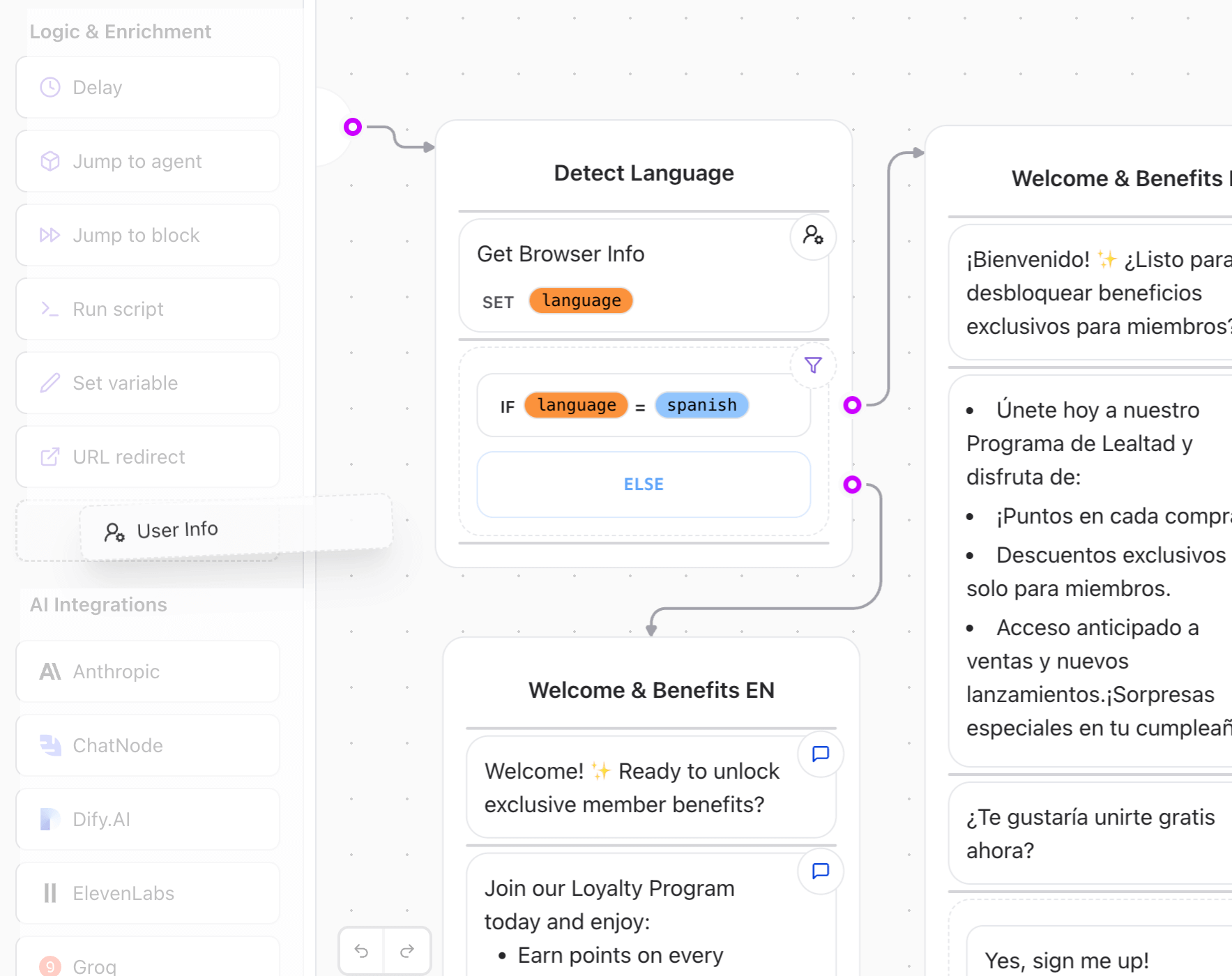 **Important**: This element uses IP-based geolocation (not GPS). Location data is derived from the user's IP address using Vercel's geolocation headers, providing country, city, and approximate coordinates based on ISP location.
## Key Features
* **🛡️ Privacy by Default**: Automatic anonymization for EU users
* **🌍 IP Geolocation**: Location data derived from IP address with privacy protection
* **📱 Device Detection**: Hardware and browser information
* **⚖️ GDPR Compliant**: Built-in legal compliance mechanisms
* **🔧 Flexible Options**: Both anonymized and raw data available
## Available Actions
**Important**: This element uses IP-based geolocation (not GPS). Location data is derived from the user's IP address using Vercel's geolocation headers, providing country, city, and approximate coordinates based on ISP location.
## Key Features
* **🛡️ Privacy by Default**: Automatic anonymization for EU users
* **🌍 IP Geolocation**: Location data derived from IP address with privacy protection
* **📱 Device Detection**: Hardware and browser information
* **⚖️ GDPR Compliant**: Built-in legal compliance mechanisms
* **🔧 Flexible Options**: Both anonymized and raw data available
## Available Actions
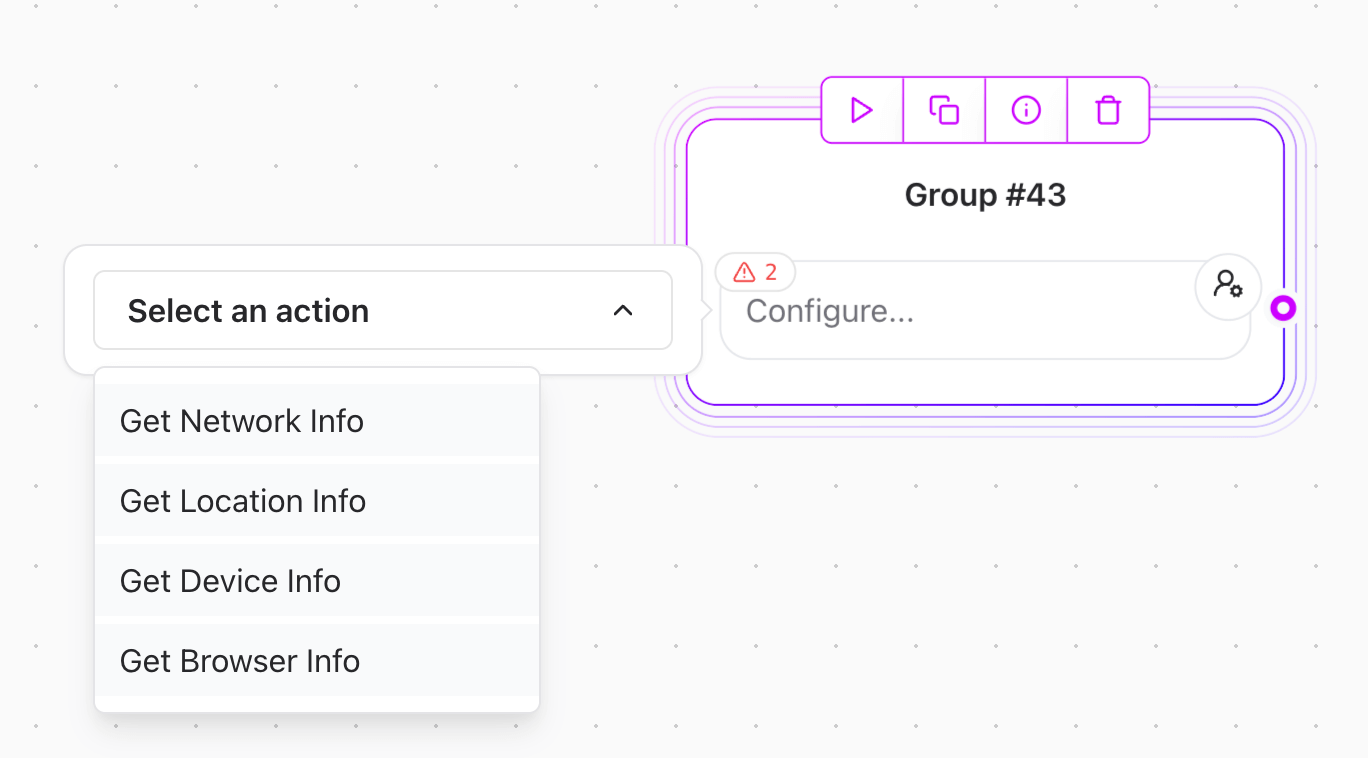 ## Available Actions
The User Info element provides four specialized actions for different types of user data:
### 1. Get Network Info
Collect network-related information including IP address, referer, user agent, and host.
### 2. Get Location Info
Retrieve geographical data such as country, city, coordinates, and region information based on IP geolocation.
### 3. Get Device Info
Gather device hardware details including type, vendor, and model.
### 4. Get Browser Info
Obtain browser and operating system information including name, version, and language preferences.
## GDPR Risk Classification
Understanding the privacy implications of each data type:
### 🔴 High Risk Data (Automatically Protected)
* **IP Address**: Last octet anonymized for IPv4, final segments for IPv6
* **IP Geolocation Coordinates**: Precision reduced to \~1km for EU users (based on IP address, not GPS)
### 🟡 Medium Risk Data (Partially Anonymized)
* **Referer**: Only origin domain preserved for EU users
* **User Agent**: Detailed version information removed for EU users
### 🟢 Low Risk Data (No Anonymization Required)
* **Country, City, Region**: General location data
* **Device Type, Vendor, Model**: Hardware information
* **Browser Name, Version**: Software information
* **Operating System**: Platform details
* **Host**: Request destination
## Network Information Collection
### Basic Network Data Setup
Use the **Get Network Info** action to collect network-related data:
**Available Variables:**
* `IP` - Anonymized IP address (GDPR-safe)
* `IP (Raw)` - Original IP address (requires consent)
* `Referer` - Anonymized referring URL (GDPR-safe)
* `Referer (Raw)` - Original referring URL (requires consent)
* `User Agent` - Partially anonymized user agent (GDPR-safe)
* `User Agent (Raw)` - Original user agent (requires consent)
* `Host` - Request host (no privacy risk)
**Example Configuration:**
```
Network Variables:
- Map "IP" to {{user_ip}}
- Map "Referer" to {{referring_site}}
- Map "User Agent" to {{browser_info}}
- Map "Host" to {{request_host}}
```
### Network Data Usage Example
Create a personalized welcome message based on network information:
**Text element:**
```
Welcome! 👋
We detected you're visiting from:
- IP Region: {{user_ip}}
- Referring Site: {{referring_site}}
- Browser: {{browser_info}}
How can we help you today?
```
## Location Information Collection
### Geographic Data Setup
Use the **Get Location Info** action to collect IP-based geographical data:
**Data Source**: Location information is derived from the user's IP address using Vercel's geolocation service. This provides approximate location based on ISP data, not device GPS.
**Available Variables:**
* `Country` / `Country (Raw)` - User's country
* `City` / `City (Raw)` - User's city
* `Continent` / `Continent (Raw)` - Continental region
* `Region` / `Region (Raw)` - State/province information
* `Latitude` - Reduced precision coordinates (GDPR-safe, IP-based)
* `Latitude (Raw)` - Original precision coordinates (requires consent, IP-based)
* `Longitude` - Reduced precision coordinates (GDPR-safe, IP-based)
* `Longitude (Raw)` - Original precision coordinates (requires consent, IP-based)
* `Is EU Country` - **Critical boolean for GDPR compliance and regional logic**
**Is EU Country** is one of the most valuable variables for building compliant, region-aware chatbots. Use this to trigger different flows, privacy notices, data handling, pricing, and legal compliance automatically.
**Example Configuration:**
```
Location Variables:
- Map "Country" to {{user_country}}
- Map "City" to {{user_city}}
- Map "Is EU Country" to {{is_eu_user}} ⭐ (Critical for compliance)
- Map "Latitude" to {{user_lat}}
- Map "Longitude" to {{user_lng}}
```
### Location-Based Personalization
Create location-aware content and services using the powerful **Is EU Country** flag:
**GDPR Compliance Flow:**
```
Condition: {{is_eu_user}} equals true
EU User Flow:
"Welcome from {{user_city}}, {{user_country}}! 🇪🇺
We're committed to protecting your privacy under GDPR.
Your data is automatically anonymized for compliance."
Non-EU User Flow:
"Hello from {{user_city}}, {{user_country}}! 🌍
We're excited to serve customers worldwide.
Your approximate location: {{user_lat}}, {{user_lng}} (based on IP)"
```
**Regional Business Logic:**
```
Condition: {{is_eu_user}} equals true
EU Pricing Flow:
"Prices shown include VAT as required by EU law.
🇪🇺 EU Price: €99 (VAT included)
📋 Legal: Cookie consent required"
Non-EU Pricing Flow:
"💵 US Price: $99 (tax calculated at checkout)
🚀 No cookie consent needed - faster checkout!"
```
**Data Collection Strategy:**
```
Condition: {{is_eu_user}} equals true
EU Data Collection:
"We automatically minimize data collection for EU users.
✅ GDPR compliant by default
🛡️ Anonymized analytics only
📋 Full data deletion rights"
Standard Data Collection:
"We collect analytics to improve your experience.
📊 Full analytics enabled
🚀 Personalization features active
⚡ Enhanced user insights"
```
## Device Information Collection
### Hardware Detection Setup
Use the **Get Device Info** action to collect device details:
**Available Variables:**
* `Device Type` - Mobile, desktop, tablet, etc.
* `Device Vendor` - Manufacturer (Apple, Samsung, etc.)
* `Device Model` - Specific model name
**Example Configuration:**
```
Device Variables:
- Map "Device Type" to {{device_type}}
- Map "Device Vendor" to {{device_brand}}
- Map "Device Model" to {{device_model}}
```
### Device-Optimized Experience
Adapt the conversation based on device capabilities:
**Conditional Logic element:**
```
Condition: {{device_type}} equals "mobile"
Mobile Flow:
"We see you're on a {{device_brand}} {{device_model}}! 📱
Our mobile-optimized experience is perfect for on-the-go interactions.
Would you like to enable quick actions?"
Desktop Flow:
"Welcome to our full desktop experience! 💻
You have access to all advanced features and detailed information.
How would you like to proceed?"
```
## Browser Information Collection
### Browser and OS Detection
Use the **Get Browser Info** action to collect browser details:
**Available Variables:**
* `Browser Name` - Chrome, Firefox, Safari, etc.
* `Browser Version` - Version number
* `Browser Language` - Full language preference
* `Browser Language Code` - ISO language code
* `Browser Language Region` - Regional preference
* `OS Name` - Operating system
* `OS Version` - OS version number
**Example Configuration:**
```
Browser Variables:
- Map "Browser Name" to {{browser_name}}
- Map "Browser Language Code" to {{user_language}}
- Map "OS Name" to {{operating_system}}
```
### Multi-Language Support
Implement automatic language detection:
**Conditional Logic element:**
```
Condition: {{user_language}} equals "es"
Spanish Flow:
"¡Hola! Detectamos que prefieres español. 🇪🇸
¿Te gustaría continuar en español?"
English Flow:
"Hello! We detected your browser language as {{user_language}}.
Would you like to continue in English or switch languages?"
```
## Complete Workflow Example
Let's create a comprehensive user profiling system:
### Step 1: Collect All User Information
**User Info Collection element:**
```
Collecting your information for personalization...
```
Add multiple **User Info** actions:
1. **Get Network Info**:
* Map "IP" to `{{user_ip}}`
* Map "Host" to `{{request_host}}`
2. **Get Location Info**:
* Map "Country" to `{{user_country}}`
* Map "City" to `{{user_city}}`
* Map "Is EU Country" to `{{is_eu_user}}`
3. **Get Device Info**:
* Map "Device Type" to `{{device_type}}`
* Map "Device Vendor" to `{{device_brand}}`
4. **Get Browser Info**:
* Map "Browser Name" to `{{browser_name}}`
* Map "Browser Language Code" to `{{user_language}}`
* Map "OS Name" to `{{operating_system}}`
### Step 2: Create User Profile Summary
**Text element:**
```
📊 Your Profile Summary
🌍 Location: {{user_city}}, {{user_country}}
📱 Device: {{device_brand}} {{device_type}}
🌐 Browser: {{browser_name}} on {{operating_system}}
🗣️ Language: {{user_language}}
🛡️ Privacy Status: {{#if is_eu_user}}GDPR Protected{{else}}Standard{{/if}}
This information helps us provide you with the best possible experience!
```
### Step 3: Privacy Notice for EU Users
**Conditional Logic element:**
```
Condition: {{is_eu_user}} equals true
EU Privacy Notice:
"🛡️ GDPR Privacy Notice
As an EU resident, your data is automatically protected:
- Your IP address has been anonymized
- Location coordinates have reduced precision
- All data collection complies with GDPR requirements
You can request data deletion at any time.
Do you consent to us using this anonymized data to improve your experience?"
Non-EU Flow:
"📊 Data Collection Notice
We've collected basic information to personalize your experience.
This data helps us provide better service and relevant content.
You can opt out of data collection at any time."
```
## The Power of "Is EU Country" Detection
The **Is EU Country** variable is arguably the most powerful single data point for building compliant, region-aware chatbots. This boolean flag automatically determines if a user is in an EU country and enables:
### ⚖️ **Automatic Legal Compliance**
* **GDPR compliance** without manual configuration
* **Cookie consent** flows triggered automatically
* **Data retention** policies applied correctly
* **Privacy notices** shown when required
### 💰 **Regional Business Logic**
* **VAT-inclusive pricing** for EU customers
* **Currency conversion** and regional offers
* **Shipping restrictions** and local regulations
* **Payment method** availability by region
### 🛡️ **Privacy-First User Experience**
* **Automatic data anonymization** for EU users
* **Transparent data handling** messaging
* **User rights** information (deletion, access, portability)
* **Consent management** workflows
### 🌍 **Localization and Personalization**
* **Language detection** combined with region
* **Cultural adaptation** of communication style
* **Regional content** and product availability
* **Local support** routing and business hours
### Example: Smart EU Detection Flow
```
[Get Location Info: Map "Is EU Country" to {{is_eu_user}}]
Condition: {{is_eu_user}} equals true
EU User Experience:
"🇪🇺 Welcome! We've automatically enabled GDPR protection.
• Your data is anonymized
• Cookies require consent
• Prices include VAT
• You have full data rights
Continue with privacy protection? [Yes] [Learn More]"
Non-EU User Experience:
"🌍 Welcome! Enjoy our full-featured experience.
• Complete analytics enabled
• Personalization active
• Streamlined checkout
• Enhanced recommendations
Ready to get started? [Yes] [Customize Privacy]"
```
**Critical Implementation Note**: Always use the **Is EU Country** flag as your primary decision point for GDPR compliance, not individual country checks. This ensures you catch all 27 EU member states automatically, including any future additions.
## Best Practices
### Privacy and Compliance
1. **Automatic Protection**: The element automatically protects EU users - no additional configuration needed
2. **Consent Management**: Use raw data options only with proper legal basis
3. **Data Minimization**: Collect only the data you actually need
4. **Transparency**: Always inform users about data collection
### Performance Optimization
1. **Selective Collection**: Use only the actions you need (network, location, device, browser)
2. **Variable Mapping**: Map only necessary variables to avoid bloat
3. **Conditional Logic**: Use collected data to optimize user experience
### Error Handling
1. **Graceful Degradation**: Ensure your flow works even if user info collection fails
2. **Fallback Content**: Provide default experiences when data is unavailable
3. **Validation**: Verify collected data before using in critical logic
## Privacy Considerations
### For EU Users (Automatic)
* IP addresses are automatically anonymized (last octet removed)
* IP geolocation coordinates are reduced to \~1km precision
* Referer URLs are truncated to origin only
* User agents have detailed version info removed
### For All Users
* Device and browser information is considered low-risk
* Country and city data are generally safe
* Host information poses no privacy risks
### Raw Data Usage
* Use "(Raw)" variables only with proper consent
* Ensure compliance with local privacy laws
* Document your legal basis for raw data collection
## Troubleshooting
### Common Issues
1. **No Data Collected**: Ensure at least one variable is mapped in response mapping
2. **Empty Variables**: Check that the action is placed after user interaction starts
3. **GDPR Conflicts**: Verify you have consent before using raw data options
4. **Location Inaccuracy**: Remember that EU coordinates have reduced precision and are IP-based (not GPS)
### Debugging Tips
1. **Test Both EU and Non-EU**: Use VPN to test different regional behaviors
2. **Check Browser Console**: Network requests may provide additional debugging info
3. **Validate Mappings**: Ensure variable names match exactly in your flows
4. **Monitor Privacy Flags**: Use "Is EU Country" to understand protection status
## Data Structure Reference
### Network Data Format
```javascript theme={null}
{
ip: "192.168.1.0", // Anonymized for EU
ipRaw: "192.168.1.123", // Original IP
referer: "https://example.com", // Origin only for EU
refererRaw: "https://example.com/path?param=value",
userAgent: "Mozilla/5.0 (Windows NT; Win64; x64) Chrome",
userAgentRaw: "Mozilla/5.0 (Windows NT 10.0; Win64; x64) Chrome/120.0.0.0",
host: "yoursite.com"
}
```
### Location Data Format
```javascript theme={null}
{
country: "United States",
city: "New York",
continent: "North America",
region: "New York",
latitude: 40.71, // Reduced precision for EU (IP-based)
longitude: -74.01, // Reduced precision for EU (IP-based)
latitudeRaw: 40.7128, // Original precision (IP-based)
longitudeRaw: -74.0060, // Original precision (IP-based)
isEuCountry: false
}
```
**Location Accuracy**: Coordinates are derived from IP geolocation, which typically provides city-level accuracy (1-10km range) depending on ISP and infrastructure. This is not GPS data from the user's device.
### Device Data Format
```javascript theme={null}
{
type: "mobile",
vendor: "Apple",
model: "iPhone"
}
```
### Browser Data Format
```javascript theme={null}
{
name: "Chrome",
version: "120.0.0.0",
language: {
full: "en-US",
code: "en",
region: "US"
},
os: {
name: "iOS",
version: "17.1.0"
}
}
```
With these configurations, your Release0 agent can collect comprehensive user information while maintaining privacy compliance and providing personalized experiences across different devices, locations, and user preferences.
## Important Limitations
### IP Geolocation vs GPS
* **What it is**: Location data derived from IP address geolocation
* **What it's not**: GPS coordinates from user's device
* **Accuracy**: City-level accuracy (1-10km range), varies by ISP
* **Source**: Vercel's geolocation headers based on IP infrastructure
### Data Availability
* Location data depends on Vercel's geolocation service
* Some corporate networks or VPNs may provide inaccurate location data
* Mobile networks may show ISP location rather than user's actual location
* Coordinates may be null for some IP ranges
> 💡 Want to see how **User Info** can supercharge personalization? Read our [Build Personalized Chatbots with User Info Integration](https://release0.com/blog/build-personalized-chatbots-with-user-info-integration) blog post for practical examples and strategies.
## Available Actions
The User Info element provides four specialized actions for different types of user data:
### 1. Get Network Info
Collect network-related information including IP address, referer, user agent, and host.
### 2. Get Location Info
Retrieve geographical data such as country, city, coordinates, and region information based on IP geolocation.
### 3. Get Device Info
Gather device hardware details including type, vendor, and model.
### 4. Get Browser Info
Obtain browser and operating system information including name, version, and language preferences.
## GDPR Risk Classification
Understanding the privacy implications of each data type:
### 🔴 High Risk Data (Automatically Protected)
* **IP Address**: Last octet anonymized for IPv4, final segments for IPv6
* **IP Geolocation Coordinates**: Precision reduced to \~1km for EU users (based on IP address, not GPS)
### 🟡 Medium Risk Data (Partially Anonymized)
* **Referer**: Only origin domain preserved for EU users
* **User Agent**: Detailed version information removed for EU users
### 🟢 Low Risk Data (No Anonymization Required)
* **Country, City, Region**: General location data
* **Device Type, Vendor, Model**: Hardware information
* **Browser Name, Version**: Software information
* **Operating System**: Platform details
* **Host**: Request destination
## Network Information Collection
### Basic Network Data Setup
Use the **Get Network Info** action to collect network-related data:
**Available Variables:**
* `IP` - Anonymized IP address (GDPR-safe)
* `IP (Raw)` - Original IP address (requires consent)
* `Referer` - Anonymized referring URL (GDPR-safe)
* `Referer (Raw)` - Original referring URL (requires consent)
* `User Agent` - Partially anonymized user agent (GDPR-safe)
* `User Agent (Raw)` - Original user agent (requires consent)
* `Host` - Request host (no privacy risk)
**Example Configuration:**
```
Network Variables:
- Map "IP" to {{user_ip}}
- Map "Referer" to {{referring_site}}
- Map "User Agent" to {{browser_info}}
- Map "Host" to {{request_host}}
```
### Network Data Usage Example
Create a personalized welcome message based on network information:
**Text element:**
```
Welcome! 👋
We detected you're visiting from:
- IP Region: {{user_ip}}
- Referring Site: {{referring_site}}
- Browser: {{browser_info}}
How can we help you today?
```
## Location Information Collection
### Geographic Data Setup
Use the **Get Location Info** action to collect IP-based geographical data:
**Data Source**: Location information is derived from the user's IP address using Vercel's geolocation service. This provides approximate location based on ISP data, not device GPS.
**Available Variables:**
* `Country` / `Country (Raw)` - User's country
* `City` / `City (Raw)` - User's city
* `Continent` / `Continent (Raw)` - Continental region
* `Region` / `Region (Raw)` - State/province information
* `Latitude` - Reduced precision coordinates (GDPR-safe, IP-based)
* `Latitude (Raw)` - Original precision coordinates (requires consent, IP-based)
* `Longitude` - Reduced precision coordinates (GDPR-safe, IP-based)
* `Longitude (Raw)` - Original precision coordinates (requires consent, IP-based)
* `Is EU Country` - **Critical boolean for GDPR compliance and regional logic**
**Is EU Country** is one of the most valuable variables for building compliant, region-aware chatbots. Use this to trigger different flows, privacy notices, data handling, pricing, and legal compliance automatically.
**Example Configuration:**
```
Location Variables:
- Map "Country" to {{user_country}}
- Map "City" to {{user_city}}
- Map "Is EU Country" to {{is_eu_user}} ⭐ (Critical for compliance)
- Map "Latitude" to {{user_lat}}
- Map "Longitude" to {{user_lng}}
```
### Location-Based Personalization
Create location-aware content and services using the powerful **Is EU Country** flag:
**GDPR Compliance Flow:**
```
Condition: {{is_eu_user}} equals true
EU User Flow:
"Welcome from {{user_city}}, {{user_country}}! 🇪🇺
We're committed to protecting your privacy under GDPR.
Your data is automatically anonymized for compliance."
Non-EU User Flow:
"Hello from {{user_city}}, {{user_country}}! 🌍
We're excited to serve customers worldwide.
Your approximate location: {{user_lat}}, {{user_lng}} (based on IP)"
```
**Regional Business Logic:**
```
Condition: {{is_eu_user}} equals true
EU Pricing Flow:
"Prices shown include VAT as required by EU law.
🇪🇺 EU Price: €99 (VAT included)
📋 Legal: Cookie consent required"
Non-EU Pricing Flow:
"💵 US Price: $99 (tax calculated at checkout)
🚀 No cookie consent needed - faster checkout!"
```
**Data Collection Strategy:**
```
Condition: {{is_eu_user}} equals true
EU Data Collection:
"We automatically minimize data collection for EU users.
✅ GDPR compliant by default
🛡️ Anonymized analytics only
📋 Full data deletion rights"
Standard Data Collection:
"We collect analytics to improve your experience.
📊 Full analytics enabled
🚀 Personalization features active
⚡ Enhanced user insights"
```
## Device Information Collection
### Hardware Detection Setup
Use the **Get Device Info** action to collect device details:
**Available Variables:**
* `Device Type` - Mobile, desktop, tablet, etc.
* `Device Vendor` - Manufacturer (Apple, Samsung, etc.)
* `Device Model` - Specific model name
**Example Configuration:**
```
Device Variables:
- Map "Device Type" to {{device_type}}
- Map "Device Vendor" to {{device_brand}}
- Map "Device Model" to {{device_model}}
```
### Device-Optimized Experience
Adapt the conversation based on device capabilities:
**Conditional Logic element:**
```
Condition: {{device_type}} equals "mobile"
Mobile Flow:
"We see you're on a {{device_brand}} {{device_model}}! 📱
Our mobile-optimized experience is perfect for on-the-go interactions.
Would you like to enable quick actions?"
Desktop Flow:
"Welcome to our full desktop experience! 💻
You have access to all advanced features and detailed information.
How would you like to proceed?"
```
## Browser Information Collection
### Browser and OS Detection
Use the **Get Browser Info** action to collect browser details:
**Available Variables:**
* `Browser Name` - Chrome, Firefox, Safari, etc.
* `Browser Version` - Version number
* `Browser Language` - Full language preference
* `Browser Language Code` - ISO language code
* `Browser Language Region` - Regional preference
* `OS Name` - Operating system
* `OS Version` - OS version number
**Example Configuration:**
```
Browser Variables:
- Map "Browser Name" to {{browser_name}}
- Map "Browser Language Code" to {{user_language}}
- Map "OS Name" to {{operating_system}}
```
### Multi-Language Support
Implement automatic language detection:
**Conditional Logic element:**
```
Condition: {{user_language}} equals "es"
Spanish Flow:
"¡Hola! Detectamos que prefieres español. 🇪🇸
¿Te gustaría continuar en español?"
English Flow:
"Hello! We detected your browser language as {{user_language}}.
Would you like to continue in English or switch languages?"
```
## Complete Workflow Example
Let's create a comprehensive user profiling system:
### Step 1: Collect All User Information
**User Info Collection element:**
```
Collecting your information for personalization...
```
Add multiple **User Info** actions:
1. **Get Network Info**:
* Map "IP" to `{{user_ip}}`
* Map "Host" to `{{request_host}}`
2. **Get Location Info**:
* Map "Country" to `{{user_country}}`
* Map "City" to `{{user_city}}`
* Map "Is EU Country" to `{{is_eu_user}}`
3. **Get Device Info**:
* Map "Device Type" to `{{device_type}}`
* Map "Device Vendor" to `{{device_brand}}`
4. **Get Browser Info**:
* Map "Browser Name" to `{{browser_name}}`
* Map "Browser Language Code" to `{{user_language}}`
* Map "OS Name" to `{{operating_system}}`
### Step 2: Create User Profile Summary
**Text element:**
```
📊 Your Profile Summary
🌍 Location: {{user_city}}, {{user_country}}
📱 Device: {{device_brand}} {{device_type}}
🌐 Browser: {{browser_name}} on {{operating_system}}
🗣️ Language: {{user_language}}
🛡️ Privacy Status: {{#if is_eu_user}}GDPR Protected{{else}}Standard{{/if}}
This information helps us provide you with the best possible experience!
```
### Step 3: Privacy Notice for EU Users
**Conditional Logic element:**
```
Condition: {{is_eu_user}} equals true
EU Privacy Notice:
"🛡️ GDPR Privacy Notice
As an EU resident, your data is automatically protected:
- Your IP address has been anonymized
- Location coordinates have reduced precision
- All data collection complies with GDPR requirements
You can request data deletion at any time.
Do you consent to us using this anonymized data to improve your experience?"
Non-EU Flow:
"📊 Data Collection Notice
We've collected basic information to personalize your experience.
This data helps us provide better service and relevant content.
You can opt out of data collection at any time."
```
## The Power of "Is EU Country" Detection
The **Is EU Country** variable is arguably the most powerful single data point for building compliant, region-aware chatbots. This boolean flag automatically determines if a user is in an EU country and enables:
### ⚖️ **Automatic Legal Compliance**
* **GDPR compliance** without manual configuration
* **Cookie consent** flows triggered automatically
* **Data retention** policies applied correctly
* **Privacy notices** shown when required
### 💰 **Regional Business Logic**
* **VAT-inclusive pricing** for EU customers
* **Currency conversion** and regional offers
* **Shipping restrictions** and local regulations
* **Payment method** availability by region
### 🛡️ **Privacy-First User Experience**
* **Automatic data anonymization** for EU users
* **Transparent data handling** messaging
* **User rights** information (deletion, access, portability)
* **Consent management** workflows
### 🌍 **Localization and Personalization**
* **Language detection** combined with region
* **Cultural adaptation** of communication style
* **Regional content** and product availability
* **Local support** routing and business hours
### Example: Smart EU Detection Flow
```
[Get Location Info: Map "Is EU Country" to {{is_eu_user}}]
Condition: {{is_eu_user}} equals true
EU User Experience:
"🇪🇺 Welcome! We've automatically enabled GDPR protection.
• Your data is anonymized
• Cookies require consent
• Prices include VAT
• You have full data rights
Continue with privacy protection? [Yes] [Learn More]"
Non-EU User Experience:
"🌍 Welcome! Enjoy our full-featured experience.
• Complete analytics enabled
• Personalization active
• Streamlined checkout
• Enhanced recommendations
Ready to get started? [Yes] [Customize Privacy]"
```
**Critical Implementation Note**: Always use the **Is EU Country** flag as your primary decision point for GDPR compliance, not individual country checks. This ensures you catch all 27 EU member states automatically, including any future additions.
## Best Practices
### Privacy and Compliance
1. **Automatic Protection**: The element automatically protects EU users - no additional configuration needed
2. **Consent Management**: Use raw data options only with proper legal basis
3. **Data Minimization**: Collect only the data you actually need
4. **Transparency**: Always inform users about data collection
### Performance Optimization
1. **Selective Collection**: Use only the actions you need (network, location, device, browser)
2. **Variable Mapping**: Map only necessary variables to avoid bloat
3. **Conditional Logic**: Use collected data to optimize user experience
### Error Handling
1. **Graceful Degradation**: Ensure your flow works even if user info collection fails
2. **Fallback Content**: Provide default experiences when data is unavailable
3. **Validation**: Verify collected data before using in critical logic
## Privacy Considerations
### For EU Users (Automatic)
* IP addresses are automatically anonymized (last octet removed)
* IP geolocation coordinates are reduced to \~1km precision
* Referer URLs are truncated to origin only
* User agents have detailed version info removed
### For All Users
* Device and browser information is considered low-risk
* Country and city data are generally safe
* Host information poses no privacy risks
### Raw Data Usage
* Use "(Raw)" variables only with proper consent
* Ensure compliance with local privacy laws
* Document your legal basis for raw data collection
## Troubleshooting
### Common Issues
1. **No Data Collected**: Ensure at least one variable is mapped in response mapping
2. **Empty Variables**: Check that the action is placed after user interaction starts
3. **GDPR Conflicts**: Verify you have consent before using raw data options
4. **Location Inaccuracy**: Remember that EU coordinates have reduced precision and are IP-based (not GPS)
### Debugging Tips
1. **Test Both EU and Non-EU**: Use VPN to test different regional behaviors
2. **Check Browser Console**: Network requests may provide additional debugging info
3. **Validate Mappings**: Ensure variable names match exactly in your flows
4. **Monitor Privacy Flags**: Use "Is EU Country" to understand protection status
## Data Structure Reference
### Network Data Format
```javascript theme={null}
{
ip: "192.168.1.0", // Anonymized for EU
ipRaw: "192.168.1.123", // Original IP
referer: "https://example.com", // Origin only for EU
refererRaw: "https://example.com/path?param=value",
userAgent: "Mozilla/5.0 (Windows NT; Win64; x64) Chrome",
userAgentRaw: "Mozilla/5.0 (Windows NT 10.0; Win64; x64) Chrome/120.0.0.0",
host: "yoursite.com"
}
```
### Location Data Format
```javascript theme={null}
{
country: "United States",
city: "New York",
continent: "North America",
region: "New York",
latitude: 40.71, // Reduced precision for EU (IP-based)
longitude: -74.01, // Reduced precision for EU (IP-based)
latitudeRaw: 40.7128, // Original precision (IP-based)
longitudeRaw: -74.0060, // Original precision (IP-based)
isEuCountry: false
}
```
**Location Accuracy**: Coordinates are derived from IP geolocation, which typically provides city-level accuracy (1-10km range) depending on ISP and infrastructure. This is not GPS data from the user's device.
### Device Data Format
```javascript theme={null}
{
type: "mobile",
vendor: "Apple",
model: "iPhone"
}
```
### Browser Data Format
```javascript theme={null}
{
name: "Chrome",
version: "120.0.0.0",
language: {
full: "en-US",
code: "en",
region: "US"
},
os: {
name: "iOS",
version: "17.1.0"
}
}
```
With these configurations, your Release0 agent can collect comprehensive user information while maintaining privacy compliance and providing personalized experiences across different devices, locations, and user preferences.
## Important Limitations
### IP Geolocation vs GPS
* **What it is**: Location data derived from IP address geolocation
* **What it's not**: GPS coordinates from user's device
* **Accuracy**: City-level accuracy (1-10km range), varies by ISP
* **Source**: Vercel's geolocation headers based on IP infrastructure
### Data Availability
* Location data depends on Vercel's geolocation service
* Some corporate networks or VPNs may provide inaccurate location data
* Mobile networks may show ISP location rather than user's actual location
* Coordinates may be null for some IP ranges
> 💡 Want to see how **User Info** can supercharge personalization? Read our [Build Personalized Chatbots with User Info Integration](https://release0.com/blog/build-personalized-chatbots-with-user-info-integration) blog post for practical examples and strategies.