> ## Documentation Index
> Fetch the complete documentation index at: https://docs.release0.com/llms.txt
> Use this file to discover all available pages before exploring further.
# How to use the Number input element
> Collect numerical inputs from users with configurable constraints like minimum, maximum, and step values. Ideal for ratings, estimates, and age inputs in your chatbot agent.
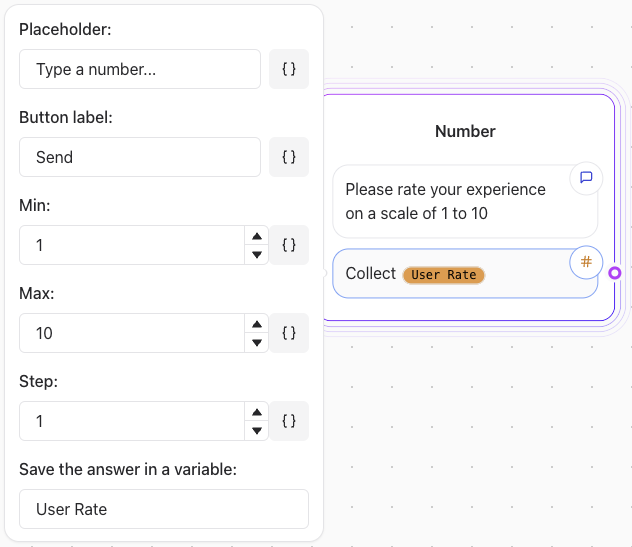
The **Number** User Input element is designed to collect numerical responses from users. It offers configurable options to specify input constraints such as minimum and maximum values, and step increments.
 ## Key Features
* **Minimum Value**: Set the lowest acceptable number.
* Example: If `min = 1`, the user cannot input a number less than 1.
* **Maximum Value**: Define the highest acceptable number.
* Example: If `max = 100`, the user cannot input a number greater than 100.
* **Step Value**: Specify the increment between allowed numbers.
* Example: If `step = 5`, the user can input numbers like 5, 10, 15, etc.
## Example Configuration
### Asking for a Rating (1 to 10)
* **Minimum**: 1
* **Maximum**: 10
* **Step**: 1
User prompt:\
"Rate your experience on a scale of 1 to 10."
### Collecting a Price Estimate
* **Minimum**: 0
* **Maximum**: 10000
* **Step**: 0.01
User prompt:\
"Enter your price estimate in dollars (up to two decimal places)."
### Asking for Age
* **Minimum**: 0
* **Maximum**: 120
* **Step**: 1
User prompt:\
"How old are you?"
## Considerations
* **Validation**: Ensure the number input aligns with the constraints to avoid errors.
* **User Feedback**: Provide clear instructions to guide users on acceptable inputs.
* **Testing**: Verify the element's behavior for edge cases (e.g., entering values outside the allowed range).
By leveraging the Number Input element, you can gather structured numerical data efficiently while ensuring user inputs meet your specified criteria.
## Key Features
* **Minimum Value**: Set the lowest acceptable number.
* Example: If `min = 1`, the user cannot input a number less than 1.
* **Maximum Value**: Define the highest acceptable number.
* Example: If `max = 100`, the user cannot input a number greater than 100.
* **Step Value**: Specify the increment between allowed numbers.
* Example: If `step = 5`, the user can input numbers like 5, 10, 15, etc.
## Example Configuration
### Asking for a Rating (1 to 10)
* **Minimum**: 1
* **Maximum**: 10
* **Step**: 1
User prompt:\
"Rate your experience on a scale of 1 to 10."
### Collecting a Price Estimate
* **Minimum**: 0
* **Maximum**: 10000
* **Step**: 0.01
User prompt:\
"Enter your price estimate in dollars (up to two decimal places)."
### Asking for Age
* **Minimum**: 0
* **Maximum**: 120
* **Step**: 1
User prompt:\
"How old are you?"
## Considerations
* **Validation**: Ensure the number input aligns with the constraints to avoid errors.
* **User Feedback**: Provide clear instructions to guide users on acceptable inputs.
* **Testing**: Verify the element's behavior for edge cases (e.g., entering values outside the allowed range).
By leveraging the Number Input element, you can gather structured numerical data efficiently while ensuring user inputs meet your specified criteria.