> ## Documentation Index
> Fetch the complete documentation index at: https://docs.release0.com/llms.txt
> Use this file to discover all available pages before exploring further.
# How to use the Phone input element
> Collect and validate phone numbers with customizable formatting options and country code settings. Ideal for user registration and contact forms in your chatbot agent.
The **Phone Number** User Input element allows you to collect phone numbers from users with proper formatting and consistent storage. You can set a default country code or accept international numbers.
 ## Key Features
* **Validation**: Ensures that the input is properly formatted as a phone number.
* **Consistent Format**: Stores phone numbers in a standardized format for easy processing.
* **Default Country Code**:
* Specify a default country code (e.g., `USA +1`) to simplify user input.
* Leave it open to accept international phone numbers if needed.
## Configuration Options
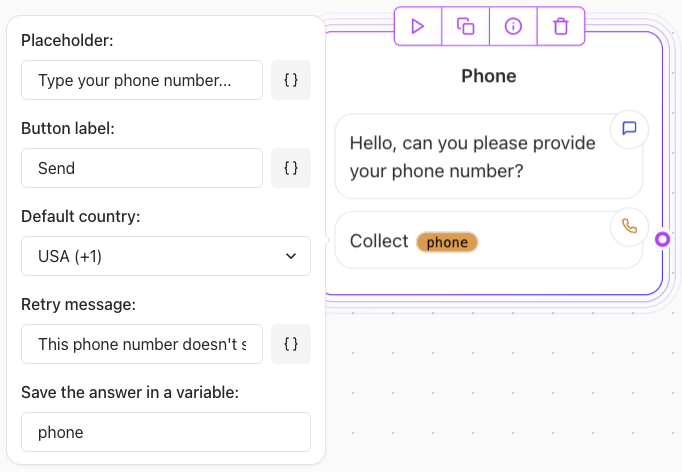
* **Prompt user**: Ask the user for the phone number using the text **[Agent Dialog Text element](/editor/elements/agent-dialog/text)** (e.g., "Type your phone number...").
* **Button Label**: Set the label for the submission button (e.g., "Send").
* **Default Country**: Choose a default country code or allow international inputs.
* **Retry Message**: Define a message to display if the phone number is improperly formatted (e.g., "This phone number doesn't seem valid.").
## Example Use Case
* **Collecting a Local Phone Number**:
* Default Country: USA (+1)
* Prompt user: "Type your phone number..."
* Retry message: "The phone number entered does not seem valid"
* Button Label: "Send"
User prompt:\
"What's your phone number?"
Behavior: The element will automatically apply the +1 country code unless the user enters a different international code.
## Key Features
* **Validation**: Ensures that the input is properly formatted as a phone number.
* **Consistent Format**: Stores phone numbers in a standardized format for easy processing.
* **Default Country Code**:
* Specify a default country code (e.g., `USA +1`) to simplify user input.
* Leave it open to accept international phone numbers if needed.
## Configuration Options
* **Prompt user**: Ask the user for the phone number using the text **[Agent Dialog Text element](/editor/elements/agent-dialog/text)** (e.g., "Type your phone number...").
* **Button Label**: Set the label for the submission button (e.g., "Send").
* **Default Country**: Choose a default country code or allow international inputs.
* **Retry Message**: Define a message to display if the phone number is improperly formatted (e.g., "This phone number doesn't seem valid.").
## Example Use Case
* **Collecting a Local Phone Number**:
* Default Country: USA (+1)
* Prompt user: "Type your phone number..."
* Retry message: "The phone number entered does not seem valid"
* Button Label: "Send"
User prompt:\
"What's your phone number?"
Behavior: The element will automatically apply the +1 country code unless the user enters a different international code.