> ## Documentation Index
> Fetch the complete documentation index at: https://docs.release0.com/llms.txt
> Use this file to discover all available pages before exploring further.
# How to use the URL input element
> Collect and validate website URLs from users with built-in format validation. Ideal for user registrations, feedback forms, and content submissions in your chatbot agent.
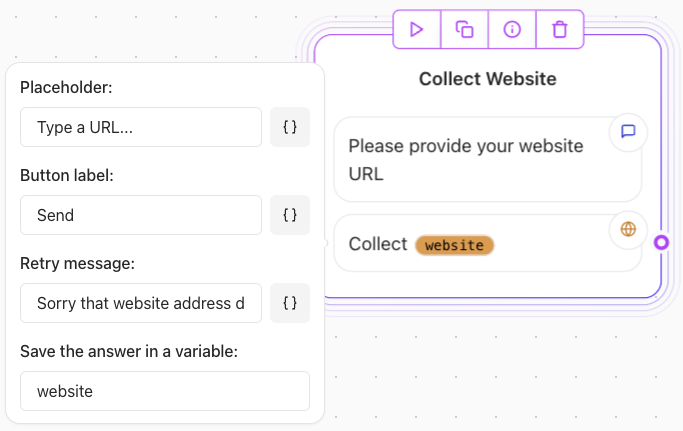
The **URL** User Input element is used to collect URL inputs from users. It validates whether the provided URL is properly formatted but does not verify its validity or accessibility.
 ## Key Features
* **URL Format Validation**: Ensures the user-provided input follows a correct URL format (e.g., `https://example.com`).
* **Retry Message**: If the URL is improperly formatted, a retry message prompts the user to re-enter the correct URL.
## Limitations
* **No Validity Check**: The element does not verify if the URL points to an active or accessible website.
* **Advanced Validation**: To check if the URL is valid or reachable, you need to use an **[HTTP Request element](/editor/elements/integrations/http-request)** to call a URL validation API.
## Example Usage
### Basic Configuration
Sample user prompt:\
"Please enter the URL of your website."
Behavior:
* The element checks if the input is a validly formatted URL.
* If the format is incorrect (e.g., missing `https://`), the user is prompted with a retry message.
##### Advanced Validation with HTTP Request element
1. Add an **HTTP Request element** after the URL Input element.
2. Configure the HTTP request to send the provided URL to a URL validation API.
3. Process the API response to determine the next steps.
Example HTTP Request Configuration:
* **API Endpoint**: `https://api.urlvalidation.com/validate?url={{website_variable}}`
* **Method**: `GET`
* **Variable**: Replace `{{website_variable}}` with the variable storing the user's URL.
## Key Features
* **URL Format Validation**: Ensures the user-provided input follows a correct URL format (e.g., `https://example.com`).
* **Retry Message**: If the URL is improperly formatted, a retry message prompts the user to re-enter the correct URL.
## Limitations
* **No Validity Check**: The element does not verify if the URL points to an active or accessible website.
* **Advanced Validation**: To check if the URL is valid or reachable, you need to use an **[HTTP Request element](/editor/elements/integrations/http-request)** to call a URL validation API.
## Example Usage
### Basic Configuration
Sample user prompt:\
"Please enter the URL of your website."
Behavior:
* The element checks if the input is a validly formatted URL.
* If the format is incorrect (e.g., missing `https://`), the user is prompted with a retry message.
##### Advanced Validation with HTTP Request element
1. Add an **HTTP Request element** after the URL Input element.
2. Configure the HTTP request to send the provided URL to a URL validation API.
3. Process the API response to determine the next steps.
Example HTTP Request Configuration:
* **API Endpoint**: `https://api.urlvalidation.com/validate?url={{website_variable}}`
* **Method**: `GET`
* **Variable**: Replace `{{website_variable}}` with the variable storing the user's URL.