> ## Documentation Index
> Fetch the complete documentation index at: https://docs.release0.com/llms.txt
> Use this file to discover all available pages before exploring further.
# How to integrate your Agent with FlutterFlow
> Integrate your Release0 agent with FlutterFlow using Webview elements. Follow these steps to embed your chatbot seamlessly in your FlutterFlow project.
Integrating your agent with FlutterFlow is a straightforward process. Follow these steps to get started:
1. Go to the **Integrations** tab of your agent's **flow editor**.
2. Click the **FlutterFlow** button to get the embed instructions.
3. Copy the provided code snippet.
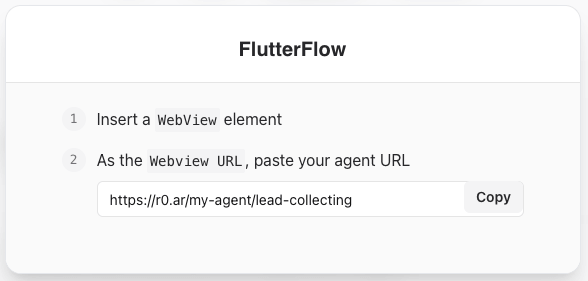 4. Insert a **Webview** element into your FlutterFlow project.
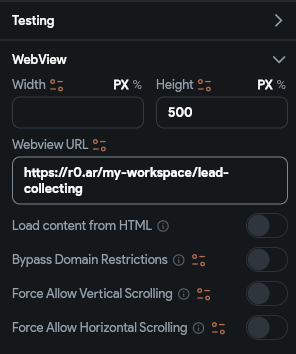
5. Paste the code into the **Webview** element's **URL** field.
4. Insert a **Webview** element into your FlutterFlow project.
5. Paste the code into the **Webview** element's **URL** field.
 6. Save the changes to your project.
7. Your agent should now be embedded in your FlutterFlow project.
8. Test the integration by running your project and interacting with the agent.
6. Save the changes to your project.
7. Your agent should now be embedded in your FlutterFlow project.
8. Test the integration by running your project and interacting with the agent.