> ## Documentation Index
> Fetch the complete documentation index at: https://docs.release0.com/llms.txt
> Use this file to discover all available pages before exploring further.
# How to integrate Release0 with Next.js
> Integrate Release0 agents in Next.js applications with lazy-loaded components for optimal performance. This guide provides usage examples, and integration methods for Next.js applications.
## Installation
To install the library for use with Next.js, run the following command:
```bash theme={null}
npm install @release0.com/nextjs
```
## Usage
This library is a convenient wrapper around the **agent react** library. It ensures that components are **lazy-loaded** for optimal performance in your Next.js application.
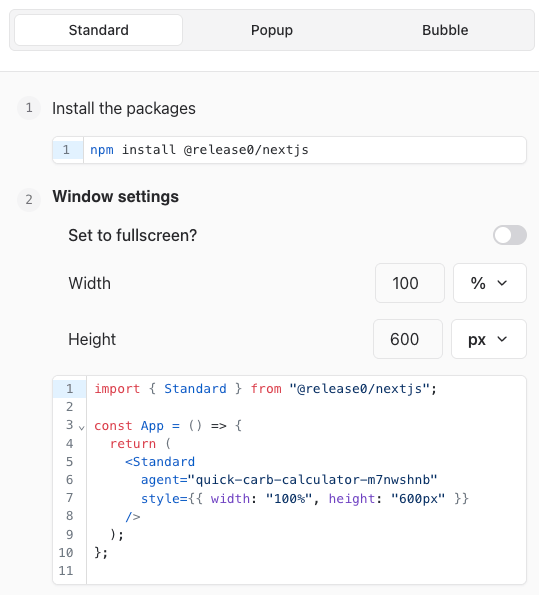
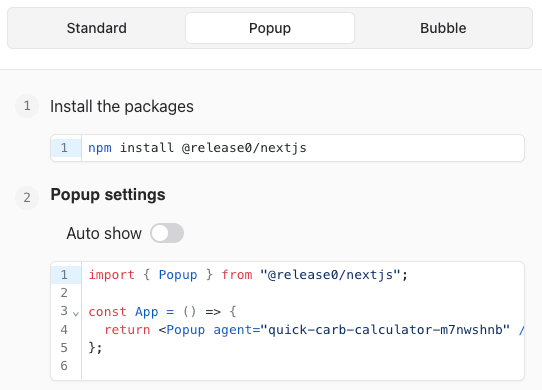
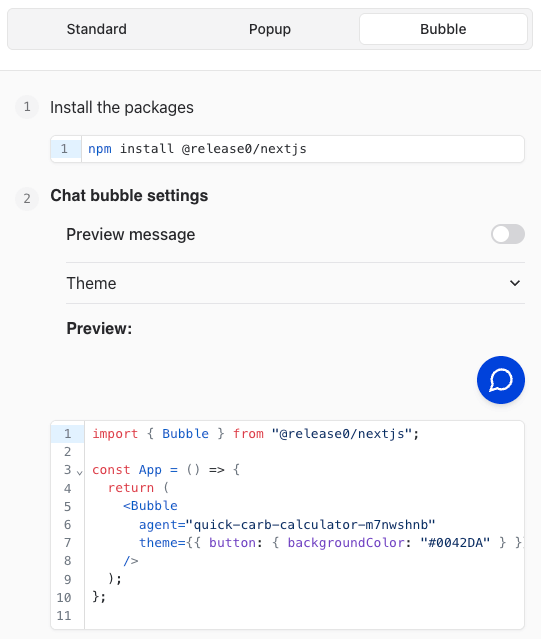
The NextJS component can be added integrated in 3 ways:
**Standard Integration**
 **Popup Integration**
 **Bubble Integration**
 ### Example Code
Use it the same way you would use the **agent react** library. Below is an example of integration:
```javascript theme={null}
import dynamic from 'next/dynamic';
// Dynamically import the agent component
const agentComponent = dynamic(() => import('@release0.com/react'), { ssr: false });
export default function agentPage() {
return (
);
}
```
### Explanation
1. **Dynamic Import**: The library is designed for lazy-loading, which is achieved through `next/dynamic`. This ensures the component is not included in the server-side rendering (SSR) process.
2. **Agent ID**: Replace `your-agent-id` with the ID of your configured Agent.
### Validation and Testing
Before deploying, confirm the following:
* The `AgentComponent` renders without errors in both development and production environments.
* The agent ID used corresponds to an active Agent.
* Lazy-loading is functioning correctly (check the network tab for dynamic imports).
### Example Code
Use it the same way you would use the **agent react** library. Below is an example of integration:
```javascript theme={null}
import dynamic from 'next/dynamic';
// Dynamically import the agent component
const agentComponent = dynamic(() => import('@release0.com/react'), { ssr: false });
export default function agentPage() {
return (
);
}
```
### Explanation
1. **Dynamic Import**: The library is designed for lazy-loading, which is achieved through `next/dynamic`. This ensures the component is not included in the server-side rendering (SSR) process.
2. **Agent ID**: Replace `your-agent-id` with the ID of your configured Agent.
### Validation and Testing
Before deploying, confirm the following:
* The `AgentComponent` renders without errors in both development and production environments.
* The agent ID used corresponds to an active Agent.
* Lazy-loading is functioning correctly (check the network tab for dynamic imports).