Features
- Text-to-Speech Conversion: Transforms a text input into speech using ElevenLabs’ models.
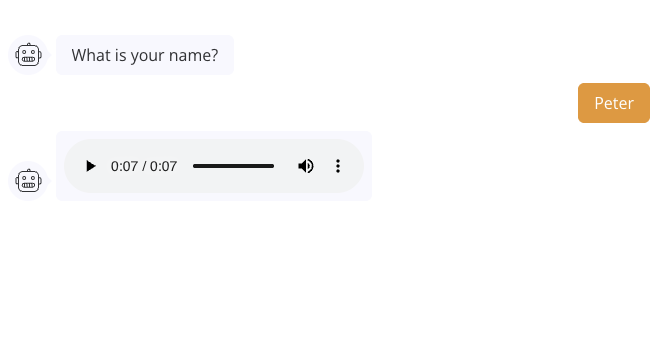
- Temporary Audio Link: Generates a temporary URL to the audio file, which can be used directly in an Audio Agent Dialog or other functionalities.
How to Set Up the Integration
1. Obtain ElevenLabs API Key
- Visit ElevenLabs and log in.
- Navigate to your API Key section and copy the key for use in your configuration.
2. Configure your Agent flow
Add your ElevenLabs element to your agent flow. This element will allow you to convert text into speech. Then configure the element with the following parameters:- ElevenLabs API Key: Paste your ElevenLabs API key here.
- Text: The text you want to convert into speech. This can be a static text or a variable that holds the text.
- Voice: Select the voice model you want to use for the conversion. ElevenLabs provides various voice options.
- Model: Choose the model you want to use for the text-to-speech conversion. Different models may have different characteristics and capabilities.
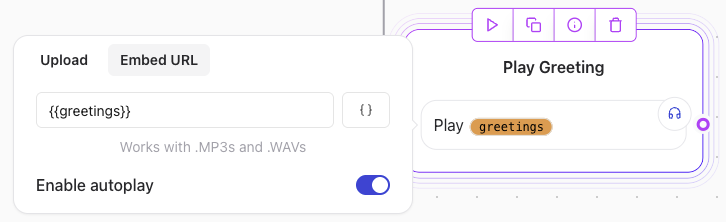
- Save audio URL in variable Save the generated audio URL in a variable for later use. Call the variable using an Audio Agent Dialog element to play the audio.

Example: Text-to-Speech API Request
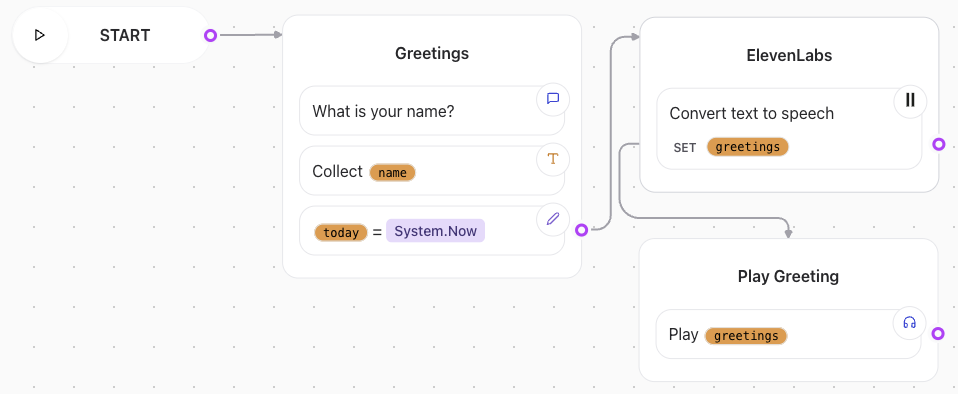
- Create a short greeting message using the Text dialog element.
- Prompt the user to enter their name using the Text Input element.
- Use the ElevenLabs element to convert the greeting message into speech. For example, if the greeting message is “Hello, [User’s Name]!”, you can set the Text parameter to
Hello, {{user_name}}. - Select the desired voice and model from the ElevenLabs options.
- Save the generated audio URL in a variable, e.g.,
greetings.