

How the Pixel element Works
When a Pixel element is added to your flow:- Initialization:
The Meta Pixel is initialized, and aPageViewevent is automatically tracked as soon as the page loads.
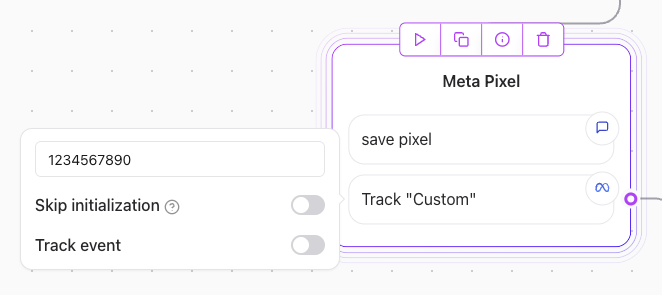
- Event Tracking:
Specific events, such as a form submission or a button click, are tracked when the element is executed.
Configuration Steps
1. Finding my Meta Pixel ID
- Go to your Meta Events Manager and select the Pixel you want to use.
- Copy the Pixel ID from the settings page.
2. Adding the Pixel ID
- Enter your Meta Pixel ID (e.g.,
73627907634) into the input field in the configuration box. - This ID connects your Agent flow to your Meta Ads account for event tracking.
3. Event Tracking
- Toggle the “Track event” option to enable event tracking.
- Specify the event name (e.g.,
Lead) in the dropdown or input field. - Optionally, click Add parameter to pass additional data (like user information) with the event.
4. How to check if the Pixel is working
- Use the Meta Events Manager to verify that your Pixel is firing correctly.
- Select your Pixel and navigate to the Test Events tab.
- Check for the
PageViewevent in the Events Received section for any custom events you have set up.

Example Use Case
Flow Example:
Event Tracking:
In the example image:- Pixel ID:
73627907634is used. - The
Leadevent is tracked whenever the element is executed. - Optional parameters can include user data (e.g.,
NameorEmail).
Best Practices
- Test Your Pixel: Use the Meta Events Manager to ensure the Pixel is working and events are logged correctly.
- Unique Event Names: Use descriptive and unique event names to avoid confusion in tracking.
- Add Parameters: Include user data, such as
NameorEmail, to make your event tracking more insightful.