

Key Features
- Validation: Ensures that the input is properly formatted as a phone number.
- Consistent Format: Stores phone numbers in a standardized format for easy processing.
- Default Country Code:
- Specify a default country code (e.g.,
USA +1) to simplify user input. - Leave it open to accept international phone numbers if needed.
- Specify a default country code (e.g.,
Configuration Options
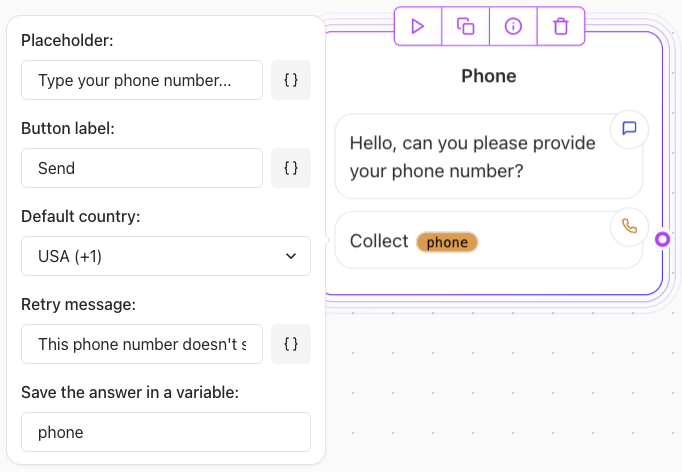
- Prompt user: Ask the user for the phone number using the text Agent Dialog Text element (e.g., “Type your phone number…”).
- Button Label: Set the label for the submission button (e.g., “Send”).
- Default Country: Choose a default country code or allow international inputs.
- Retry Message: Define a message to display if the phone number is improperly formatted (e.g., “This phone number doesn’t seem valid.”).
Example Use Case
- Collecting a Local Phone Number:
- Default Country: USA (+1)
- Prompt user: “Type your phone number…”
- Retry message: “The phone number entered does not seem valid”
- Button Label: “Send”
“What’s your phone number?” Behavior: The element will automatically apply the +1 country code unless the user enters a different international code.